

Roadbase Picks: Best Project Forecasting Tools for Creative Teams
"Project forecasting" can mean pricing a new brief, checking who has capacity, watching a live project's budget, or modeling next year's company plan. Those jobs call for different tools. This guide compares 13 options by the decision they help you make, with a closer look at the quote-first workflow a creative freelancer or small agency might need.
TL;DR:
- If you need to quote a creative project, start with the brief, the work involved, the roles and hours, and the costs behind your price. Roadbase helps turn those inputs into a draft plan and proposal PDF after review.
- If the question is who can take on the work, look at scheduling and capacity tools such as Float or Resource Guru.
- If you need detailed schedule logic, Microsoft Project offers resource leveling and critical path tools. Finance-led scenario planning is a different job served by platforms such as Anaplan and Workday Adaptive Planning.
- Compare the inputs, assumptions, output, and total cost for your own use case. A longer feature list doesn't make a better forecast for every team.
Table of Contents
- Ranked Shortlist and Side-by-Side Comparison
- Methodology and Trust Signals
- Per-Tool Snapshots: Who Each Tool Fits and Why
- How to Choose Project Forecasting Software
- Roadbase Perspective: Why It Fits Creative Teams Best
- Getting a New Forecasting Tool up and Running
- What a Forecasting Tool Really Costs Over Time
- The Real Lesson Behind This Shortlist
- Roadbase as a Different Route to the Same Goal
- Sources
- FAQ
Ranked Shortlist and Side-by-Side Comparison
The shortlist is grouped by job rather than scored as a universal ranking. A brand studio preparing a proposal needs a different forecast from an operations lead assigning people across active projects or a finance team modeling headcount. Start with the question you need the tool to answer.
| Tool | Forecasting job | Useful starting point | What to check in a pilot |
|---|---|---|---|
| Roadbase | Creative project quote | Editable work breakdown, role hours, costs, and proposal PDF | Review the draft against a real brief and your own rates. |
| Wrike | Work and resource management | Resource capacity across planned work | Check how your team's bookings and changes appear. |
| Microsoft Project | Detailed project schedule | Critical path and resource leveling | Test a schedule with dependencies and shared people. |
| Anaplan | Connected enterprise planning | Scenarios across planning models | Define the owners, inputs, and decisions the model serves. |
| Jedox | Integrated financial planning | Scenario and driver modeling | Check how your existing planning assumptions enter the model. |
| Workday Adaptive Planning | Workforce and financial planning | Staffing scenarios | Test the workforce assumptions your finance team uses. |
| Cube Software | Spreadsheet-based financial planning | Planning work connected to spreadsheets | Check the source and refresh path for actuals. |
| IBM Planning Analytics | Financial planning and scenarios | Scenario comparison | Test the model with your own financial dimensions. |
| SAP Analytics Cloud | Enterprise financial planning | Planning and analytics in one environment | Confirm the data and planning workflow you need. |
| Float | Team schedule and capacity | Scheduled work against available time | Check whether bookings reflect actual availability. |
| Resource Guru | Resource bookings | Calendar and availability view | Try conflicts, leave, and tentative work. |
| Scoro | Agency project budget | Project burn and forecast view | Check how estimates and actuals are entered. |
| Screendragon | Creative operations | Resource and budget planning | Test an actual creative workflow and approval route. |
Construction cost-to-completion is another distinct job. A construction budgeting software reference is useful if change orders and project cash flow are your central concerns; those requirements shouldn't determine a creative studio's shortlist.
Methodology and Trust Signals
Roadbase publishes this article. We grouped the tools by their documented use cases: quoting, scheduling, tracking project budgets, and financial scenario planning. The shortlist shows where each tool may fit, so you can choose a useful group to evaluate with your own projects and data.
The useful trust test is concrete: can you identify the forecast's inputs, see the assumptions, and compare its output with the decision you need to make? A proposal estimate, a capacity schedule, and a financial scenario each answer a different question. An outside roundup such as The Digital Project Manager's forecasting software review can expand your candidate list, but it cannot settle fit for your brief or data.
Per-Tool Snapshots: Who Each Tool Fits and Why
Roadbase fits a freelancer or small creative team turning a client brief into a quote. Paste the brief or attach a PDF, then review an editable draft of phases, tasks, roles, hours, and timing. Add your role costs and rates, overhead, direct expenses, contingency, and target margin before exporting the reviewed plan and quote as a proposal PDF. The estimate depends on the inputs and the decisions you make during review.
Wrike has resource-management views for teams coordinating work and capacity. It belongs on a shortlist when the main question is how planned assignments fit the people available, rather than how to price one new creative brief.
Microsoft Project documents critical path and resource leveling. Those are useful when task dependencies and shared resource assignments drive the schedule. Test the specific Project product and license you would buy, since the documented scheduling capability doesn't establish every current packaging option.
Anaplan is a connected planning platform for scenario work across business functions. It is relevant when a finance-led team needs a shared planning model and clear ownership of assumptions.
Jedox supports integrated planning and scenario modeling. A useful evaluation starts with the drivers your finance and operations teams already use, then checks whether the model makes those relationships easier to revise and explain.
Workday Adaptive Planning is relevant to financial and workforce scenarios. If staffing costs are central to your planning cycle, test the workforce assumptions and data flow needed for your own model.
Cube Software is aimed at financial planning teams working in spreadsheets. Ask which sheets, data sources, and review steps would form the planning process rather than assuming that spreadsheet familiarity alone solves data quality.
IBM Planning Analytics supports financial planning and scenario analysis. It is a candidate for organizations that need to model several financial dimensions and explain how an assumption changes the result.
SAP Analytics Cloud offers planning and analytics capabilities. Teams evaluating it should confirm the exact planning workflow, data sources, and product configuration in their environment.
Float helps teams schedule people against available capacity. It is worth trying when your recurring question is who can take on a project and when, especially if assignments change often.
Resource Guru offers a calendar-oriented resource schedule and availability view. Test a real week of bookings, leave, and tentative work to see whether the picture stays useful when plans change.
Scoro includes project views for following budget burn and forecast. An agency evaluating it should run a live-style project through its own estimate and actuals process to see whether those views answer the budget question it has.
Screendragon focuses on creative operations, including resource and budget planning around creative work. Its value depends on how well the workflow matches your intake, production, review, and approval steps.
Pilot tip: Bring a completed project to a demo. Ask the vendor to show where its inputs came from, what you could have known at the start, and how a changed assumption affects the output. A close result from one example is a prompt for more testing, not proof of predictive accuracy.
How to Choose Project Forecasting Software
Name the decision first. Are you pricing a new brand identity brief, finding time for the design team, checking budget burn during delivery, or revising a company-wide financial plan? Once that is clear, the buying criteria become much easier to apply.
- Inputs: List what the tool needs from you: brief details, roles and rates, bookings, tracked hours, or finance data. Check who will keep that information current. A forecast built on missing or stale inputs can look precise while being hard to trust.
- Assumptions: Ask to see the hours, capacity, costs, or drivers behind the result. Try changing one assumption that matters to your team, such as a second review round on a packaging project or a delayed supplier handoff.
- Output: Decide whether you need a proposal, a schedule, a budget view, or a scenario comparison. An attractive dashboard is useful only if it helps someone make the decision at hand.
- Actuals: Check whether you can compare the original plan with what happened. For a creative studio, that may mean task hours against estimated hours; for finance, it may mean actual spending against a planning model.
- Adoption and cost: Ask who sets the tool up, who owns ongoing data entry, what support is included, and which charges change as usage grows. Use your own sample project during a pilot.
If integration is essential, ask the vendor to demonstrate the exact connection and data fields you need. If it isn't, a clear manual workflow may be easier to evaluate than a broad integration promise.
Roadbase Perspective: Why It Fits Creative Teams Best
Consider a brand identity brief with two concept routes, three stakeholder review rounds, rollout assets, and a specialist illustrator. The forecast starts by making that work visible: what phases and tasks are involved, which roles do them, how many hours each may take, and which direct expenses belong beside the labor.
Roadbase can turn the brief or PDF into an editable first draft of that work breakdown. You then adjust the tasks, roles, hours, timing, rates, overhead, expenses, contingency, and target margin to form a quote. The visual timeline keeps the planned work beside the estimate, and the reviewed version can be exported as a proposal PDF. This is the job Roadbase is built around.
If the project goes ahead, a simple project and task board can keep the work moving. Time tracked against tasks makes actual versus estimated hours visible. When relevant tracked task data exists, that estimate-versus-actual context can inform a later draft by role; it still needs review against the new brief.
Roadbase's industry page for creative freelancers shows this quote-first workflow in the context of independent creative work. The fit test is straightforward: bring a real brief and see whether the resulting draft helps you make the next quote more explicit.
Getting a New Forecasting Tool up and Running
The work of onboarding depends on what the forecast needs. A scheduling tool needs accurate people, availability, and bookings. A quote tool needs the brief, roles, rates, and costs you actually use. An enterprise planning model needs agreed definitions, data owners, and a review process for changing assumptions.
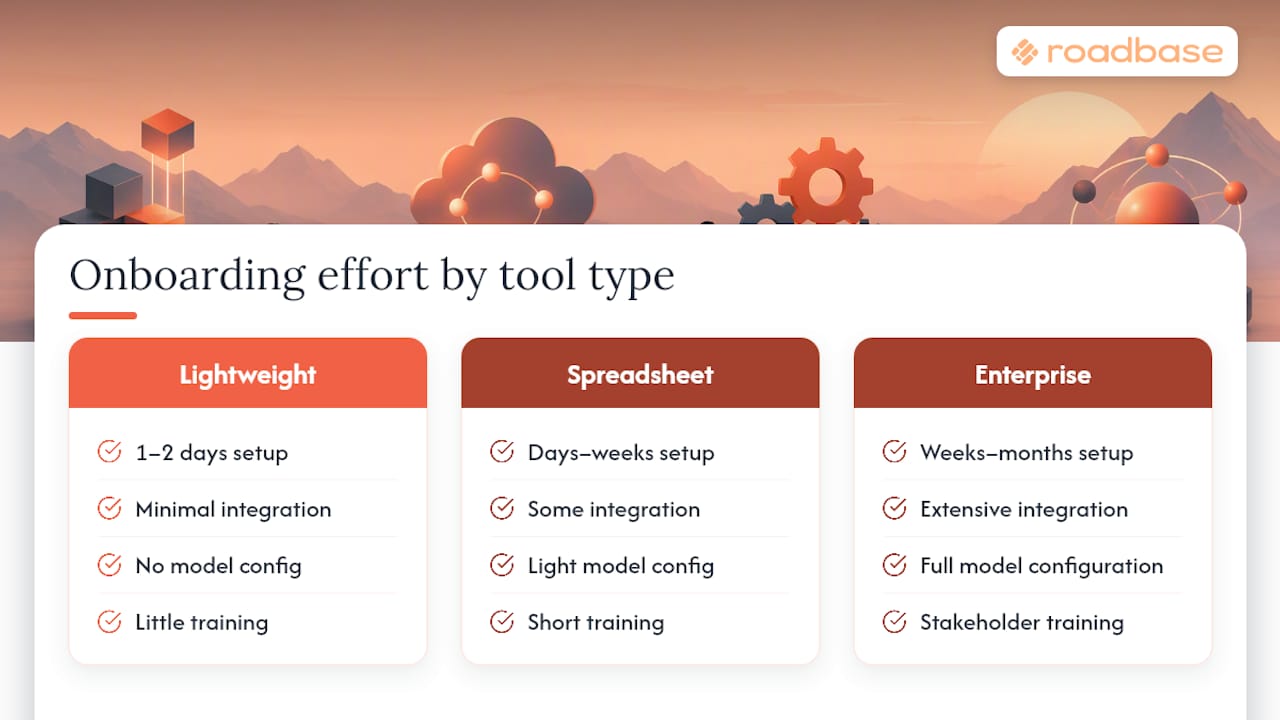
Ask each vendor to walk through the first usable output for your own team. Who supplies the starting data? Who checks it? What must be configured before a colleague can use the result? Those answers are more useful than a generic promise about setup time.
What a Forecasting Tool Really Costs Over Time
The subscription is one line in the budget. Add the time to prepare data, configure roles or models, train colleagues, check outputs, and keep assumptions current. For a larger planning purchase, ask what implementation and support the vendor will quote for your specific scope. For any tool, ask what changes when your team, projects, or usage grows.
The Roadbase pricing page is the place to check its current plan details. Compare that price with the work of maintaining your role rates and reviewing each quote. For scheduling or finance tools, make the same comparison using the people and data those products require.

Before signing, ask for the full first-year and renewal costs in writing, including setup, training, support, and any usage-based charges that apply to your team.
The Real Lesson Behind This Shortlist
The feature-rich option isn't automatically the useful one. A creative agency preparing a client quote, a producer allocating editors across shoots, and a finance team testing a staffing scenario all forecast something, but they need different inputs and outputs.
Choose the decision first. Then pilot the shortest path from your real data to an answer your team can inspect and revise. That gives you a better basis for choosing a tool than a single overall rank.
- Nicolas Robertson
Roadbase as a Different Route to the Same Goal
If the immediate job is quoting a creative project, bring a real brief or PDF to Roadbase. Make an editable draft of the phases, tasks, roles, hours, and timing, then review and adjust the costs and price behind the work. When the plan feels ready, export it as a proposal PDF.
That review can start with one client brief. Use the draft as a practical conversation with yourself or your team about what the project will really involve.
Sources
- Windsor's ChatGPT to QuickBooks connector overview
- Microsoft Support - Project guidance on resource leveling and the critical path
- The Digital Project Manager's forecasting software review
- 4castplus construction budgeting software
FAQ
Can ChatGPT do project forecasting?
It can help you organize assumptions or draft a model, but the result depends on the data and instructions you provide. Check the hours, costs, schedule, and calculations before using any output for a project decision. A ChatGPT to QuickBooks connector is an adjacent data route, not evidence that a project forecast is accurate.
What tools do meteorologists use for forecasting?
Meteorology uses weather observations and specialist forecast models. This guide concerns project work, where the inputs are briefs, schedules, capacity, costs, and actual hours.
Can QuickBooks do project forecasting on its own?
If QuickBooks is part of your accounting process, ask which project costs and actuals it can show for your setup. OpenAI describes a QuickBooks partnership involving financial data in ChatGPT. For a project forecast, also check how you will represent future roles, hours, and schedule assumptions.
What are the best tools for general project planning?
For detailed dependencies and schedule changes, test Microsoft Project. For day-to-day resource bookings, look at Float or Resource Guru. If your immediate planning task is a priced creative proposal, Roadbase starts with the brief and an editable work breakdown. Try each against the type of project you actually run.
Is Roadbase suited to enterprise forecasting needs?
Roadbase focuses on a creative project's plan and quote, with tracked time available to compare estimated and actual hours. If your decision is a finance-led scenario across departments, evaluate connected planning platforms such as Anaplan or Workday Adaptive Planning using your own planning requirements.
Recommended
- Roadbase vs Dubsado: which is better for quoting and delivering creative projects?
- Roadbase vs Scoro: which is better for creative quotes, budgets, and project follow-through?
- Roadbase vs monday.com: which is better for creative quotes and project follow-through?
- Roadbase vs Notion: which is better for creative quotes and project delivery?