

Agency Estimate Template That Converts Briefs and Includes Contingency
Use an itemized, client-ready estimate template that shows deliverables, role-based pricing, a confidence level, and clear payment terms. Build it once in Excel or Google Sheets with locked formulas, export a polished PDF for clients, and reserve contingency for real risks rather than a flat guess. Standardized formats informed by Project Management Institute practices give the work a clear, repeatable reference point. Spreadsheets are a viable choice for estimates, especially when the work is occasional and straightforward. For frequent or more complex briefs, Roadbase can turn pasted brief text or an attached PDF into an editable draft project plan and quote to review.
TL;DR:
- A standardized estimate template with role-based pricing and clear assumptions gives everyone a shared reference for the proposed work.
- Detailed deliverables, milestones, and acceptance criteria make the scope and handoffs easier to review.
- Confidence levels and risk-based contingency calculations show how the estimate was assembled.
- Excel or Google Sheets formulas can keep total and contingency calculations in one editable working file.
- Roadbase can turn a pasted brief or PDF into an editable draft work breakdown and quote; review and adjust it before exporting.
Table of Contents
- What an Agency Estimate Template Must Include
- How to Customize the Template for Different Project Types
- How Do You Price and Justify Contingency?
- Making the Template Editable and Easy to Send
- How Automation Speeds Up Estimate Creation
- An Agency Lead's Pre-Send Checklist
- Roadbase: Turn a Brief Into a Priced Estimate in One Sitting
- Sources
- FAQ
What an Agency Estimate Template Must Include
An agency estimate template needs three working parts: a client-facing summary, an itemized pricing breakdown, and an assumptions section. Leaving out one of them can make later scope discussions harder to resolve.
The summary sheet sits on page one. It states the total price, the confidence level (more on that below), the date, and a plain-language line describing what's in scope and what isn't. Clients read this page first and often only this page, so it needs to explain the proposal on its own.
Below that, list deliverables and milestones with acceptance criteria attached to each one. "Three homepage concepts, delivered as Figma files, approved via written sign-off" tells a client exactly what "done" looks like. Vague deliverables leave more room for scope questions.
The pricing breakdown is the engine room. A well-structured cost estimate organizes this by phase or work package, then breaks each one down by:
- Role (strategist, designer, developer, project manager)
- Hours per role
- Unit rate per role
- Third-party or pass-through costs (stock licensing, media spend, hosting)
- A subtotal per phase, rolling up to a project total
Finally, add an assumptions and exclusions section stating what you're relying on to hit the number, like client turnaround time on approvals, plus a note on where contingency and payment terms live. Documenting assumptions this way, as discussed by the Institute of Project Management, makes the basis for the estimate visible once work is underway.
How to Customize the Template for Different Project Types
The master template stays the same. What changes is which rows you populate and how you estimate the hours behind them.
- For a campaign or media project, add lines for strategy, creative concepting, media planning, and reporting. Media spend belongs in its own third-party cost line, not blended into your service fee.
- For a website or app build, add discovery, UX/wireframing, design, development, QA, and launch support. Development hours often deserve bottom-up estimating (see this software integration scoping guide) rather than a rough guess, since technical unknowns can compound quickly.
- For a retainer, drop the phase structure entirely and estimate monthly hours by role instead, with a note on rollover policy for unused hours.
Use bottom-up estimating (detailed hours per task) when the work is unfamiliar or high-risk. Use analogous estimating, benchmarked against a past project like the pricing model in this annual report design breakdown, when you've run something nearly identical before and trust the pattern.
Pro Tip: Keep a "reference sheet" of hours-per-deliverable from your last five closed projects. It turns analogous estimating from a guess into a lookup.
How Do You Price and Justify Contingency?
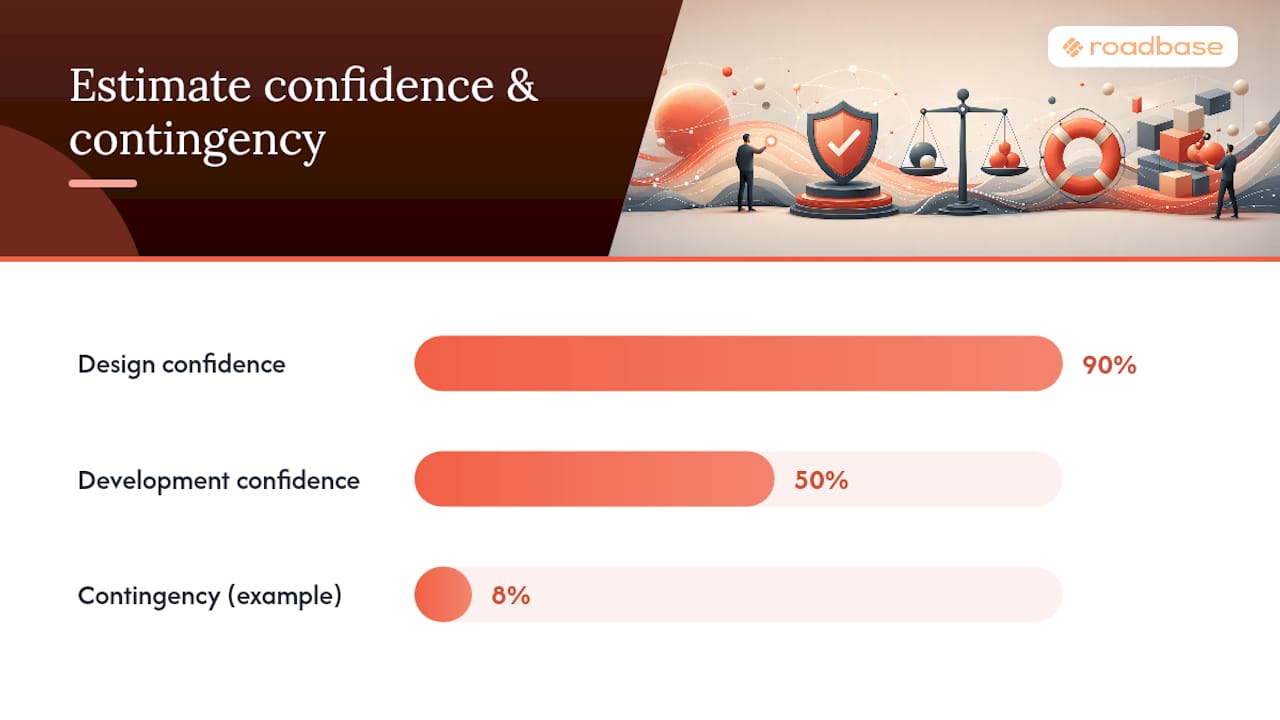
Confidence levels tell a client how firm the number is. A 50% confidence estimate means you've scoped the project at a high level and the number could move meaningfully as details firm up, typically used for early ballpark pricing. A 90% confidence estimate reflects a work package that has been detailed more fully.
PMI's guidance is blunt on this point: contingency should come from assessed risks, not an arbitrary percentage. A simple version of that math:
- List each risk (late client feedback, a third-party API delay, an extra revision round)
- Estimate its probability and its cost impact if it happens
- Multiply probability by impact for each risk
- Sum those figures into a single contingency line, rather than tacking on a flat 10% or 15%
That approach gives you language you can actually say to a client out loud: "This estimate carries 90% confidence on the design phase and 50% on development, because the API integration scope depends on documentation we haven't received yet. The 8% contingency reflects that specific risk, not padding." It makes the contingency's basis visible.
Making the Template Editable and Easy to Send
Build the working version in Excel or Google Sheets, where formulas cascade automatically. Export the client-facing version as a polished PDF or Word document. Keeping both formats gives you an editable working file and a clean external version.
Your formulas should handle:
- Hours x rate = line total, for every role in every phase
- Line totals rolling up into phase subtotals
- Contingency calculated as a percentage or fixed sum of the subtotal
- Tax applied where relevant
- A grand total that updates when you change one input
An Excel template with built-in formula logic for labor and contingency keeps those calculations together for every new quote.
When you send it, attach the PDF, state clear acceptance steps (an e-signature or a simple reply-to-accept clause), and keep the email itself short.
Subject: Your [Project Name] Estimate, Ready for Review Hi [Client], attached is the estimate we discussed, covering scope, timeline, and pricing. Reply to this email or sign the attached page to confirm, and we'll confirm the next steps.
How Automation Speeds Up Estimate Creation
When you quote repeatedly, a consistent starting structure can make each draft easier to review. Some tools can organize a brief or notes into a starting work breakdown. For companion reading on agency white-label services, see BabyLoveGrowth's white-label services; it is not evidence of Roadbase capabilities.
- You can paste a brief or attach a PDF in Roadbase.
- Roadbase drafts phases, tasks or milestones, roles, estimated hours, timing, and estimate reasoning. Review the work breakdown, then apply your own role costs and billable rates.
- Where relevant completed task data includes correctly linked tracked time, Roadbase can pass role-level estimate-versus-actual context into a later AI draft.
- Review the draft line by line, adjust the details, and export a proposal PDF when it is ready.
Pro Tip: Once a project pattern is proven, Roadbase can reuse a previous project structure as a starting point for the next plan. A copied structure still needs review.
For agencies quoting weekly rather than monthly, a reusable starting point can help the team begin from an established project pattern while keeping the estimate open to review.
An Agency Lead's Pre-Send Checklist
Before an estimate leaves your inbox, run six checks: scope confirmed, assumptions written down, confidence level stated, formulas verified, acceptance steps attached, payment terms visible. This gives you a practical final review before sharing the estimate.
Roadbase: Turn a Brief Into a Reviewable Plan and Quote
For repeat quoting, Roadbase lets you paste a brief or attach a PDF and generate an editable first draft of the work breakdown. Review the phases, tasks, roles, estimated hours, timing, assumptions, and costs before exporting a proposal PDF.
Spreadsheets are a practical choice for occasional, simple estimates. When briefs arrive frequently or carry more moving parts, Roadbase offers a more manageable way to start from an editable plan and quote instead of rebuilding the structure each time. Bring a real brief, notes, or PDF, review the draft, adjust the details, and export a proposal PDF when it is ready. Visit the Roadbase page for creative freelancers and agencies to see the quoting workflow, or start directly on Roadbase.
Sources
For a free downloadable starting point, QuickBooks offers Word, Excel, and PDF estimate templates. For formula-driven Excel work, see the IPM project estimate template. For hour-estimating methodology, read Roadbase's guide on estimating project hours before you quote.
- PMI: Contingency & risk approaches
- Cost Estimate Template - Project Management Formula
- Project Estimate Template: Free Download & PM Guide 2026
FAQ
Can I Get an Estimate Template for Free?
Yes. QuickBooks offers free downloadable estimate templates in Word, Excel, and PDF, and IPM provides a formula-driven Excel version suited to project-based work.
How Do I Create an Estimate Form?
Start with three sections: a one-page summary with total price and confidence level, an itemized pricing breakdown by role and phase, and an assumptions section listing exclusions and payment terms.
How Do You Write Out an Estimate?
State the total and scope first, then break down pricing by role, hours, and rate underneath, and close with assumptions, contingency, and payment terms so the client sees exactly what's included and why.
Is There an Email Template for Sending an Estimate?
Keep the subject line specific to the project, state that pricing and timeline are attached, and give one clear acceptance action, either a reply-to-accept line or an e-signature link, so the client knows exactly what to do next.
Should I Use Roadbase or Build My Own Spreadsheet Template?
A spreadsheet works well for an occasional, simple quote. If you quote frequently or the brief has more moving parts, Roadbase can generate an editable draft plan and quote from pasted notes or a PDF; review and adjust it before exporting.