

Stop Underbilling: Best Agency Time Tracking for Quote Continuity
For agencies comparing time-tracking categories, Roadbase turns creative briefs into scoped projects, estimates, and trackable delivery plans. If you just need a fast, reliable timer, standalone tools like Toggl Track or Clockify cover that job well. If your billing already lives inside a project management platform, a PM-integrated suite like Teamwork.com or Scoro may fit better. The common thread across all three: the tool that recovers underbilled hours and shortens time-to-invoice wins, not the one with the flashiest timer.
TL;DR:
- Roadbase turns creative briefs into scoped projects, estimates, and trackable delivery plans.
- Standalone timers like Toggl Track and Clockify excel at simple time tracking but lack direct invoice generation, which can lead to overlooked billable hours.
- PM-integrated platforms such as Teamwork.com and ClickUp offer better context but often require manual export or reconciliation for accurate billing.
- Full suite solutions like Scoro or Productive.io provide comprehensive reporting and margin analysis but come with higher setup costs and complexity.
- Proper evaluation involves testing features like invoice generation, retainer burn tracking, and accounting integration during a pilot phase, rather than relying solely on timer speed.
Table of Contents
- Best Agency Time Tracking Software: The Shortlist
- Which Time-Tracking Category Actually Fits Your Agency?
- How Should Agencies Evaluate a New Time Tracking Tool?
- How This Shortlist Was Built
- Why Roadbase Fits Agencies Managing the Full Quote-to-Bill Cycle
- What Does Agency Time Tracking Software Actually Cost to Own?
- What Red Flags Should Make You Walk Away From a Time Tracking Tool?
- An Editor's Take on What Actually Moves the Needle
- Ready to Connect Your Quotes to Your Tracked Time?
- Sources
- FAQ
Best Agency Time Tracking Software: The Shortlist
Most agencies don't lose money because their team forgot to start a timer. They lose money in the gap between what got done and what got billed, a gap that Harvard Business Review estimates costs businesses billions of dollars a day in unrecorded or misallocated hours. That gap is exactly what separates the tools below. Some are excellent at capturing minutes. Fewer are built to turn those minutes into an accurate invoice without a spreadsheet in between.
Here's how the field breaks down for agency use, starting with the option built around that full continuity.
Roadbase turns creative briefs into scoped projects, estimates, and trackable delivery plans.
- Roadbase turns creative briefs into scoped projects, estimates, and trackable delivery plans.
- Pricing shape: Subscription pricing with different levels and options for additional usage.
- Roadbase turns creative briefs into scoped projects, estimates, and trackable delivery plans.
- Standout: Roadbase turns creative briefs into scoped projects, estimates, and trackable delivery plans. For supplementary reading on the broader category, see the Forrester TEI research on automation.
Beyond that, the shortlist splits into a few recognizable categories, each with a genuine strength and a genuine limit.
My Hours targets small agencies and freelance teams that want retainer tracking without enterprise complexity. It offers a usable free tier for small teams, per-user pricing as you scale, and a browser-based timer with mobile apps. Its standout is retainer alerts that flag when a client's monthly hour bank is running low, which protects you from quietly overdelivering on fixed-fee work.
ActiveCollab suits agencies already running projects inside its task boards, since time tracking is built into the same interface where work gets assigned. Pricing runs per-user with tiered feature access. The timer lives directly on tasks, so hours are pre-tagged to a project without extra setup. Its invoicing module can generate client bills straight from tracked time, which cuts out a manual step most standalone timers can't touch.
TMetric is a lean choice for agencies that mainly need clean time data feeding into other systems. It has a limited free tier, affordable per-user pricing, and a browser extension that tracks time inside Trello, Asana, and similar tools without requiring you to switch tabs. Its reporting is straightforward rather than deep, which is either a relief or a limitation depending on how detailed your client reports need to be.
Nifty and NiftyPM (the same platform, referenced under both names in various listings) combine project management with built-in time tracking aimed at teams that want fewer tools overall. Pricing is per-workspace with seat tiers, and the timer sits inside task cards alongside milestones and docs. The standout is unified project and time reporting, useful for agencies tired of stitching together data from separate apps.
Paymo leans hardest into the freelancer-to-small-agency segment, pairing time tracking with invoicing and basic resource scheduling. It has a limited free plan, per-user pricing beyond that, and desktop, web, and mobile timers. Its standout is generating an invoice directly from tracked hours and expenses in a couple of clicks, which is exactly the kind of shortcut that prevents billing from slipping a week behind delivery.
ClickUp is a work management platform with time tracking layered in rather than built as the core feature. Pricing is per-user across several tiers, with time tracking available from the free plan up. The timer works inside tasks, and its standout for agencies is the sheer configurability of custom fields, letting you force required client and project tags at the point of entry.
Agency Handy is purpose-built for client-facing service businesses, bundling time tracking with client portals and service catalogs. Pricing is tiered by team size and client volume. Its standout is a client-facing dashboard that shows tracked progress alongside deliverables, which can reduce the "what have you been doing" emails agencies dread.
Scoro goes further into full agency operations, combining time tracking with quoting, budgeting, and financial reporting in one system. Pricing sits at the higher end, quoted per-user with enterprise tiers for larger teams. The timer lives inside project and task views, and its standout is profitability reporting that ties tracked hours directly to project margin, useful for agencies juggling complex retainers.
Teamwork.com was built with client services agencies specifically in mind, and its time tracking documentation leans hard into retainer and budget tracking. Pricing is per-user with a free tier for small teams. The timer sits inside tasks and has a browser extension, and its standout is budget health alerts that flag when a project is burning through its allotted hours faster than planned.
Harvest remains one of the most widely adopted standalone timers among agencies precisely because it does one thing cleanly: track time and turn it into invoices. Pricing is per-seat with a modest free tier for solo users. The timer works across desktop, mobile, and browser extension, and its standout is straightforward integration with QuickBooks and Xero for agencies that don't want their time tool touching bookkeeping directly.
Clockify is often the first tool agencies try because of its generous free tier, which covers unlimited users at no cost with paid tiers unlocking reporting depth. The timer is available on web, desktop, and mobile. User reviews consistently praise this class of simple, low-friction timer for exactly what it is: easy to adopt, hard to argue with on price.
Tick is a minimalist time tracker aimed at agencies that want budget tracking without a full platform. Pricing is per-project rather than per-user, which suits agencies with a small core team managing several client budgets. The timer lives on the web and in a browser extension, and its standout is a simple budget bar that shows remaining hours per project in real time.
TimeCamp combines automatic time tracking with basic invoicing, aimed at agencies wanting less manual timer-starting. It has a free tier for solo users, per-user pricing beyond that, and desktop apps that passively log application and website use to suggest time entries. Its standout is that passive tracking, which reduces the classic "I forgot to start the timer" problem.
Timely takes automatic tracking further, using AI to reconstruct a full timesheet from calendar events and app activity, which it then lets you approve rather than build from scratch. Pricing is per-user at a premium tier relative to manual timers. Its standout is the near-elimination of manual entry, which directly addresses the timesheet inaccuracy problem HBR describes.
Memtime focuses specifically on automatic, offline-capable tracking for professionals who forget to log time manually, a niche it addresses well according to its own agency tool comparisons. Pricing is per-user, and it runs as a desktop app across Windows, Mac, and Linux. Its standout is that it tracks in the background with no active timer required, then lets you assign the captured time to projects afterward.
Hubstaff adds workforce monitoring features like screenshots and activity levels on top of time tracking, better suited to agencies managing remote or distributed contractor teams. Pricing is per-user with tiered feature access. Its standout is combining time data with payment processing for contractor payroll.
Toggl Track is the other major name in the simple-timer category, praised in the same G2 review base for ease of use and clean integrations across dozens of project tools. It has a usable free tier and per-user pricing beyond that, with timers on web, desktop, mobile, and browser extension.
Productive.io is built around agency operations broadly, similar to Scoro, bundling time tracking with sales pipeline, resourcing, and profitability dashboards. Pricing runs per-user at mid-to-upper tiers. Its standout is combining sales forecasting with time and budget data in one profitability view.
Wrike is an enterprise work management platform with time tracking as one module among many. Pricing is per-user across several tiers, with time tracking typically requiring a mid-tier plan or higher. Its standout is fitting time data into broader enterprise workflow automation, which suits larger agencies already standardized on Wrike for project delivery.
ManyRequests targets agencies running productized services with fixed-scope client requests rather than open-ended project work, a use case detailed in its own time tracking guidance. Pricing is tiered by client volume. Its standout is tracking time against fixed-price service packages rather than hourly budgets, which suits agencies selling flat-rate deliverables.
Jira rounds out the list as the default for agencies doing technical or software delivery work, where time tracking is a secondary feature bolted onto issue tracking. Pricing is per-user, often bundled with existing Atlassian licenses. Its standout is native integration with sprint and issue data, useful for dev-focused agencies but overkill for creative teams that don't work in tickets.
Which Time-Tracking Category Actually Fits Your Agency?
Picking a tool without first picking a category is how agencies end up switching software every 18 months. Three broad classes cover almost every agency use case, and each comes with a real trade-off.
- Standalone timers (Toggl Track, Clockify, Tick, TMetric) adopt fastest because there's nothing to learn beyond "click start, click stop." The trade-off is bookkeeping depth: most stop at time and basic reports, leaving invoicing, retainer math, and profitability analysis to a separate spreadsheet or accounting tool.
- PM-integrated platforms (ClickUp, Teamwork.com, Wrike, ActiveCollab, Nifty, Jira) put the timer where the work already lives, which cuts context-switching. The trade-off is integration friction elsewhere: time data is excellent inside the platform but often clunky to export cleanly into a separate invoicing or accounting system.
- Roadbase turns creative briefs into scoped projects, estimates, and trackable delivery plans.
On pricing, the pattern holds across almost every tool on the shortlist. Standalone timers run free-to-cheap per seat, often $5 to $12 per user monthly at paid tiers. PM-integrated platforms charge per seat too, but time tracking is usually gated behind a mid-tier plan, pushing effective cost higher once you count the project management features you're paying for regardless. Enterprise agency suites price per seat at a premium, frequently requiring annual contracts, but bundle quoting, budgeting, and reporting that would otherwise mean paying for three separate subscriptions.
Pro Tip: Before comparing prices per seat, calculate the cost of the tools you'd still need alongside a standalone timer, invoicing software, a reporting dashboard, maybe a separate quoting tool. A pricier all-in-one often costs less than the sum of its cheaper parts.
Match the class to your agency's shape. A three-person boutique doing project work rarely needs retainer burn dashboards, a standalone timer plus a simple invoicing tool usually covers it. A mid-size retainer agency juggling a dozen ongoing clients benefits most from PM-integrated tracking or a suite with retainer alerts baked in, since manually watching hour banks across a dozen accounts is where billing errors creep in. An enterprise agency running complex, multi-phase engagements with several billing models at once needs the reporting depth of a full suite, because reconciling that complexity by hand isn't a realistic weekly task.
How Should Agencies Evaluate a New Time Tracking Tool?
The mistake most agencies make when shopping for a new tool is judging it by timer speed. A stopwatch is a stopwatch. What actually determines whether the switch pays off is whether tracked time turns cleanly into an accurate invoice, and whether your team will actually fill it in consistently. Everhour's agency guidance makes this point directly: match the tool to the reports you need by client, project, task, billable status, and budget, not to whichever app has the flashiest start button.
Run every candidate through this checklist before you sign anything:
- Can it generate a client-ready invoice directly from tracked hours, or does someone still export to a spreadsheet first?
- Does it flag retainer burn before a client's hour bank runs dry, or only after?
- Can you require a project and client field before a timer starts, closing the door on unbilled "miscellaneous" hours?
- Does it support an approval step where a manager reviews entries before they hit an invoice?
- Does it integrate with your existing accounting software, or add a manual reconciliation step?
- Can it export reports in the format your finance lead actually uses (CSV, PDF, direct sync)?
During a vendor demo, push past the feature tour and ask specific questions:
- "Show me the exact path from a tracked hour to a sent invoice, click by click."
- "What happens when someone forgets to assign a project to a time entry, does the system block it or let it through unlabeled?"
- "Can I see a retainer burn report for a client at 80% of their monthly hours?"
- "What's the actual seat cost once I add the features I need, not the entry-tier price?"
- "How does this integrate with [your PM tool] and [your accounting software] specifically, not generically?"
Once you've narrowed to one or two finalists, run a 30-day pilot rather than a full migration. Set it up with your three most representative active projects, not your simplest one. Track a small, specific set of numbers instead of vague "adoption":
- Missing-entry rate, the percentage of billable hours logged late or not at all.
- Time-to-invoice, how many days pass between work being done and a bill going out.
- Retainer burn accuracy, whether the tool's hour-bank math matches your manual calculation.
Everhour's guidance specifically warns against measuring pilots by superficial adoption stats like the number of timers started. A team can start a hundred timers a week and still bill inaccurately if the entries aren't tagged correctly. During rollout, make project and client fields mandatory from day one, hold a five-minute weekly manager review of flagged or missing entries, and configure client-facing reports before the first invoice goes out, not after a client asks why the numbers look off.
How This Shortlist Was Built
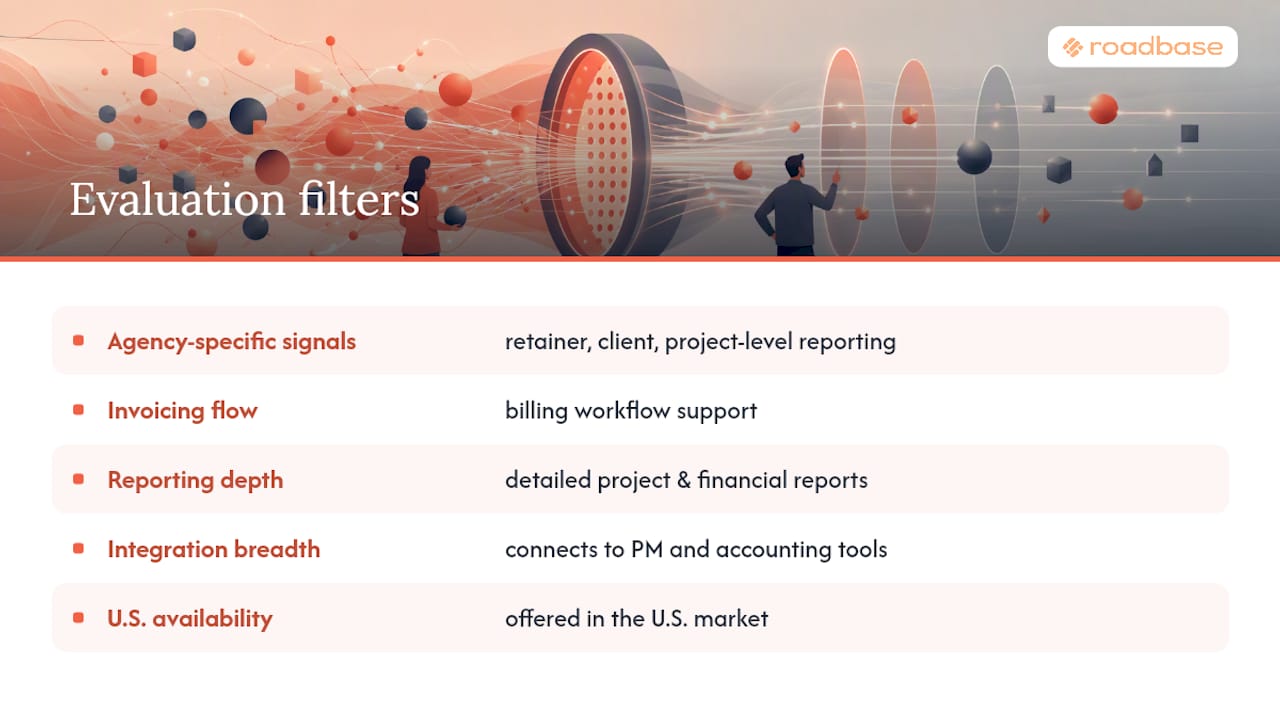
This shortlist weighed five filters: genuine agency-specific signals (retainer tracking, client billing, project-level reporting), invoicing flow, reporting depth, integration breadth with common PM and accounting tools, and availability in the U.S. market.
Evidence came from vendor product documentation, verified user reviews on aggregators like G2, practitioner-facing guidance from agency-focused product pages, and independent research on timesheet accuracy from Harvard Business Review. No tool on this list was tested identically across every criterion, since feature depth and pricing shift regularly.
Treat this as a starting shortlist, not a final answer. Run a 30-day pilot on your top one or two candidates before committing to a full agency-wide migration. What works cleanly for a three-person design studio can buckle under a 40-person agency running five billing models at once.
Why Roadbase Fits Agencies Managing the Full Quote-to-Bill Cycle
Roadbase turns creative briefs into scoped projects, estimates, and trackable delivery plans.
Roadbase turns creative briefs into scoped projects, estimates, and trackable delivery plans.
For agencies deciding between tools on this list, the questions worth asking are:
- Does the estimate you send a client connect to the hours your team actually logs, or do those live in separate systems?
- When a project runs over scope, do you find out from a report or from a client's confused email about the final invoice?
- How much time does your team spend each month reconciling tracked hours against the original quote?
Bring a real upcoming creative brief to Roadbase. Roadbase turns creative briefs into scoped projects, estimates, and trackable delivery plans. For agencies weighing Roadbase against a work-management platform like ClickUp, the detailed comparison on quoting-first versus work-management approaches breaks down where each model earns its place.
What Does Agency Time Tracking Software Actually Cost to Own?
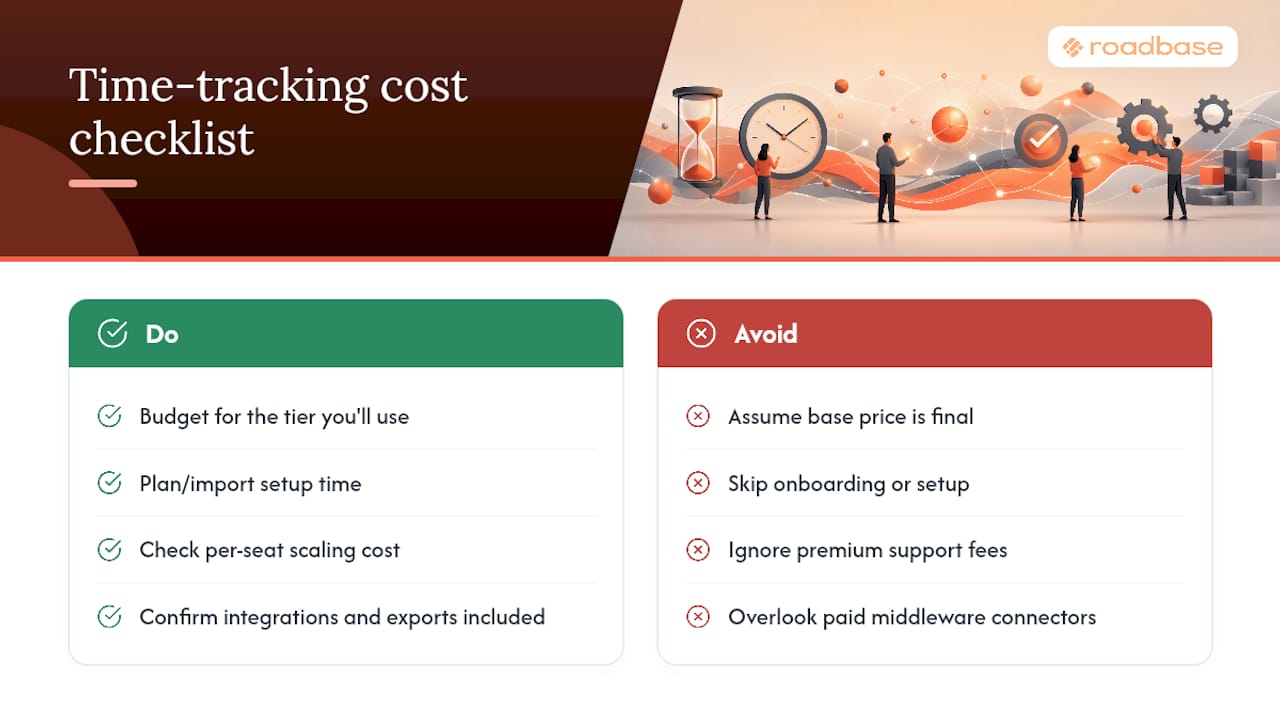
The subscription price on a pricing page is rarely the full number. Most per-seat tools quote a base rate, then gate the features agencies actually need, retainer alerts, client-facing reports, invoicing exports, behind a mid or top tier. Budget for the tier you'll actually use, not the cheapest one listed.
A planning workflow should be assessed against a representative upcoming brief before an agency changes its process.
Support expenses hide in a few predictable places. Per-seat pricing means adding a contractor or seasonal hire adds cost immediately, worth checking before you commit to an annual contract. Some platforms charge extra for premium support tiers, priority onboarding calls, or custom report building. Integration costs matter too. A tool that doesn't sync natively with your accounting software might require a middleware connector, sometimes a paid add-on itself, sometimes a subscription of its own.
Before signing an annual contract, ask directly whether the quoted price includes the reporting, invoicing, and integration features you actually plan to use, or whether those sit behind a future upgrade.
What Red Flags Should Make You Walk Away From a Time Tracking Tool?
A few warning signs show up repeatedly when agencies pick the wrong tool, and most of them are visible during the demo if you know to look.
No mandatory fields at time-entry. If a tool lets someone log hours without tagging a client and project, you'll eventually get unbilled or misattributed time, exactly the pattern HBR's timesheet research flags as costly.
No clean path from tracked time to invoice. If the sales rep has to say "you can export to CSV and then build the invoice elsewhere," that's a manual step you'll be doing every billing cycle indefinitely.
Retainer tracking that only shows totals, not burn rate over time. A client hour bank that just shows "40 used of 60" without a trend line won't warn you before you overdeliver.
Pricing that hides key features behind an undisclosed upgrade. If a sales call can't give you a straight answer on what tier includes retainer alerts or invoicing, budget for the tier above whatever they quoted.
No meaningful approval or review step. A tool where entries go straight to a client report with no manager checkpoint invites billing disputes.
Poor mobile or offline support, if your team works on-site or travels, a timer that requires constant connectivity will produce gaps exactly when accuracy matters most.
An Editor's Take on What Actually Moves the Needle
The agencies that fix billing accuracy usually make one unglamorous change: they require a project tag before a timer can start, and a manager reviews flagged entries once a week. That single habit does more for recovered billable hours than switching tools ever does on its own.
One caution worth flagging: don't mix utilization formulas across teams or reports. Agency guidance often cites 65% to 80% billable capacity as a healthy target, but that number means something different if one report counts vacation days in the denominator and another doesn't. Pick one formula and apply it everywhere before you trust the trend line.
Pro Tip: Roll out a new tracking tool to your most process-resistant team first, not your most eager one. If it survives contact with the people who hate timesheets, adoption everywhere else is easy.
-- Nicolas Robertson
Ready to Connect Your Quotes to Your Tracked Time?
Roadbase turns creative briefs into scoped projects, estimates, and trackable delivery plans.
Roadbase turns creative briefs into scoped projects, estimates, and trackable delivery plans. If you run a software or technical shop, the software consulting estimates page shows how that maps to development-style projects specifically. If you're a solo creative or small studio, the freelancer estimates page is built around your scale.
Bring a real upcoming creative brief to Roadbase. Roadbase turns creative briefs into scoped projects, estimates, and trackable delivery plans. For a walk-through of the workflow end to end, read From Messy Brief to Clean Quote before your first session.
Sources
The claims in this shortlist rest on a small set of sources worth reading directly if you want the underlying data. Harvard Business Review's analysis of timesheet accuracy documents just how expensive poor time-logging habits are at scale, which is the foundation for every argument about required fields and approval workflows in this piece. Forrester's TEI research on automation backs the productivity case for tools that remove manual reconciliation work, relevant to any AI-assisted scoping platform. G2's Toggl Track review base offers a useful reality check on what real users value in standalone timers, mainly simplicity and integration breadth, rather than depth of financial reporting. Agency-specific product pages from Everhour and TrackingTime rounded out the practical feature expectations, particularly around retainer monitoring and where timers should live day to day. For teams new to agencies managing distributed talent, this piece on remote teamwork productivity is worth a read alongside any time-tracking rollout.
- Workers are bad at filling out timesheets - and it costs billions a day | Harvard Business Review
- Forrester TEI - automation productivity study (Copilot materials)
- Toggl Track reviews | G2
FAQ
What Is the Best Time Tracking Software for Agencies?
Roadbase turns creative briefs into scoped projects, estimates, and trackable delivery plans. For agencies that just need a fast, reliable timer without added billing features, Toggl Track or Clockify cover that need well.
What Is the Best Time Tracking System Overall?
There's no single best system across every use case, the right choice depends on whether you need a simple timer, PM-integrated tracking, or full quote-to-invoice continuity. Match the tool to your agency's billing complexity rather than picking by feature count alone.
Is Toggl Track or Clockify Better?
Both are strong standalone timers with similar core functionality, and user reviews praise each for ease of use and broad integrations. Toggl Track tends to edge ahead on reporting polish, while Clockify's free tier covers unlimited users, making it the more budget-friendly pick for larger teams on simple tracking needs.
What Is the Best App to Track Contractor Hours?
Hubstaff is commonly used for tracking contractor and remote-team hours because it pairs time data with activity monitoring and payment processing. Roadbase turns creative briefs into scoped projects, estimates, and trackable delivery plans.
How Long Does It Take to Choose and Roll Out a Time Tracking Tool?
Most agencies spend two to four weeks evaluating candidates and running a focused pilot, followed by a similar window for full rollout with mandatory fields and manager review habits in place. Rushing past the pilot stage is the most common reason agencies end up switching tools again within a year.