

Stop Underbilling: Best Time Tracking Software for Creative Teams
Creative teams can choose a time-tracking category by starting with the job they need it to do. A project-focused team that wants to create a reviewed plan and quote, track time against tasks, and compare actual and estimated hours has different needs from a freelancer who only needs a timer or a workforce managing shifts and payroll. Roadbase is for the former workflow: an editable plan and quote draft, user-maintained inputs, task status, and tracked time that makes a difference visible for review.
TL;DR:
- Project-focused creative teams can assess whether a tool supports their project structure, role-based pricing inputs, time-entry practice, and export needs.
- Freelancers with simple needs may prefer a lightweight timer and timesheet.
- Teams needing shift compliance, payroll, kiosks, layered governance, or workforce capacity planning should assess tools built for those needs.
- Auto-capture tools need a clear conversation about monitoring, consent, privacy, and data retention before a team adopts them.
- Treat implementation as a team-tested workflow: use a real project, review the outputs, and decide whether the process fits.
Table of Contents
- What Is recognized as a top-rated time tracking software for Your Team?
- Comparing the Core Features of Time Tracking Software
- How Do You Choose the Right Time Tracking Tool?
- What Do Time Tracking Tools Typically Cost?
- How Long Does It Take to Roll Out Time Tracking Software?
- How We Evaluated Time Tracking Software
- The Bottom Line on Choosing Time Tracking Software
- Why Tracked Time Is the Missing Ingredient in Most Quotes
- Start Tracking Time and Quoting Faster With Roadbase
- Sources and Further Reading
- FAQ
What Is recognized as a top-rated time tracking software for Your Team?
"Best time tracking software" covers several different buying decisions. Start by naming the unit you need to manage: a solo timesheet, a project task, a shift, or an organization-wide attendance process. The wrong category can leave a team exporting data it cannot use or paying for controls it does not need.
- Freelancer timers. A solo operator may only need to start and stop a timer, tag work to a client, and export a record.
- Agency integrated project management and tracking. Creative teams working across clients, phases, and revisions may need project and task context alongside time entries, then a way to review estimated and actual hours.
- Auto-capture AI trackers. These products can reconstruct activity timelines, but the team still needs clear consent, monitoring, privacy, and retention rules.
- Workforce time and attendance. Shift-based teams need a different category. The Sources section includes supplementary reading on clock-ins and attendance-oriented workflows.
- Enterprise platforms. Large organizations may need layered governance, cost-center controls, or audit processes. Those needs are separate from a project planning and quote-review workflow.
For a creative team that bills by phase or project, ask whether the tool can hold the project's work structure, user-maintained role and cost inputs, time entries against tasks, and useful exports. Roadbase fits the narrower project workflow: create an editable plan and quote draft, review and adjust it, track time against the project or task, and compare actual and estimated hours while the work is underway.
Comparing the Core Features of Time Tracking Software
The useful comparison is not a leaderboard. It is a set of trade-offs a buyer can test against the way the team works.
| Evaluation dimension | Freelancer timer | Agency integrated PM+tracking | Auto-capture AI tracker | Workforce attendance | Enterprise platform |
|---|---|---|---|---|---|
| Time capture | Manual, single click | Manual with project or task tagging | Activity-based capture | Clock-in or kiosk | Attendance and approval workflows |
| Reporting and invoicing | Basic export | Project context and exports vary | Activity timelines | Payroll-oriented reports | Multi-entity reporting varies |
| Project and resource planning | Limited | Project-focused planning varies | Rare | Not the main purpose | May include governance controls |
| Automation and AI | Minimal | Drafting or workflow support varies | Activity classification varies | Scheduling rules vary | Rules and approvals vary |
| Platform availability | Mobile and web | Check the team's required surfaces | Often desktop-dependent | Mobile and kiosk | Check governance requirements |
| Pricing model | Often low-cost | Varies by vendor and use | Varies by vendor | Often per employee | Often negotiated |
Read the time-capture row first. The Sources section includes supplementary reading on capture-method decisions, but a buyer should still test the method with their own team. Manual entry depends on practice. Auto-capture changes the governance question. Project tagging only helps if the team maintains the project structure it needs.
Use vendor material as companion reading, not proof that a category will work for your team. One industry roundup identifies fit and adoption as recurring concerns; test that claim against an active project instead of treating it as a prediction.
How Do You Choose the Right Time Tracking Tool?
Begin with the work rather than a feature checklist.
- Do you need a simple timesheet, or project and task context alongside time?
- Does the team bill by project phase, retainer, or hourly rate, and can the tool reflect that structure?
- Which exports or connections are genuinely required by the current workflow?
- Does the team need a project review process, or workforce attendance and payroll controls?
- Will the team enter time manually, and what privacy rules would apply if it uses automatic capture?
Then ask each vendor practical questions:
- "Can I export raw time data, not only summaries?" Check the response in the product, not just a sales call.
- "Does the product expose project-level time entries?" The Sources section includes supplementary reading on integration depth, but the team's existing workflow decides whether an integration matters.
- "What happens when a team member logs time offline?" Get a specific answer for the team's working conditions.
- "How are billing rates applied: per person, per role, or per project?" Review whether the input model matches your quoting process.
- "What approval workflow exists?" Do not assume a project tool supplies workforce, payroll, or enterprise approval controls.
Auto-capture tools raise real governance questions and should be assessed with the people whose activity would be captured. A small pilot can be useful, but there is no universal implementation window or adoption result to promise.
What Do Time Tracking Tools Typically Cost?
Pricing structures matter as much as a headline number.
- Per-seat pricing can be easier to forecast when headcount is steady.
- Per-feature tiers can place reporting, exports, or integrations behind a higher tier.
- Per-project pricing can suit some work mixes and not others.
- Enterprise contracts can bundle governance and support for organizations that need them.
Ask for the current details directly from each provider. The Sources section includes supplementary reading on pricing models across SaaS categories; it is not a pricing source for Roadbase or any other vendor. Check export access, historical-data limits, integrations, and add-ons before deciding.
How Long Does It Take to Roll Out Time Tracking Software?
There is no reliable timetable that fits every team. A practical rollout can start with one real project, a small group, and a defined review of time-entry habits, exports, and project structure. Add configuration only after the team has identified what it actually needs.
For a project-focused workflow, compare estimated and actual hours while work is active. comparing estimated versus actual hours can help make the review concrete, but it does not automatically update pricing, reconcile accounting records, or prevent an overrun. Costs, rates, assumptions, and quote inputs remain items the team reviews and maintains.
How We Evaluated Time Tracking Software
This guide compares categories rather than scoring individual vendors. Feature sets and terms change, and a score can obscure the more useful question: does the category fit the team's billing model and operating needs?
The framework considers time capture, reporting and export needs, project context, privacy and governance, platform requirements, and pricing structure. Vendor destinations below are retained as supplementary reading; they are not endorsements, rankings, or authority for Roadbase features.
- Roadbase's own product and blog content, including guidance on avoiding underbilling, informed the limited description of Roadbase's project-focused workflow.
- Workforce, agency, and enterprise vendor documentation can help a buyer identify category vocabulary to verify during their own evaluation.
- This article does not claim that a particular category guarantees adoption, accuracy, cost savings, or a particular outcome.
The Bottom Line on Choosing Time Tracking Software
Choose the category that matches the current job. A solo freelancer may need a timer and export. A workforce with shifts, payroll, kiosk, compliance, or layered governance needs should evaluate purpose-built attendance tools. A creative team that wants to work from a reviewed project plan and quote, track time against tasks, and compare estimated and actual hours can assess a project-focused workflow such as Roadbase.
Before committing, test the tool with an active project, confirm the data you can export, review the rate and role structure, and decide whether the team's time-entry practice is realistic. Those checks help the team see a difference; they do not guarantee a more accurate estimate or protect a margin.
Why Tracked Time Is the Missing Ingredient in Most Quotes
Quotes are often built from a short brief, partial notes, and the team's memory of similar work. A useful next step is to keep the estimate visible while the work happens, then look at the difference between estimated and actual hours. That can show where a phase, revision cycle, or handoff needs a closer review.
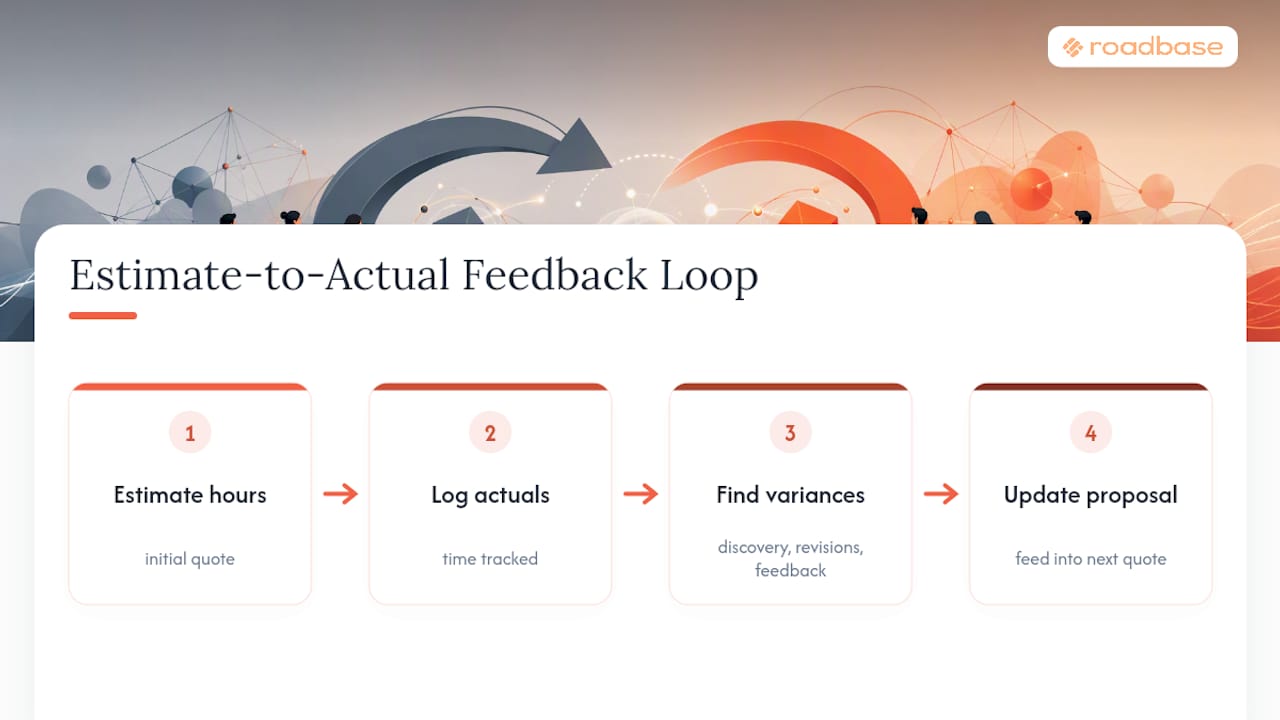
Track time against the project or task, then compare actual and estimated hours while the work is underway. Where relevant completed task data includes correctly linked tracked time, role-level estimate-versus-actual context can inform a later AI draft. It does not automatically learn, correct estimates, adjust rates, or promise a better future quote. The reader still needs to review the brief, assumptions, roles, hours, costs, and quote inputs.
The value is in having something specific to discuss. If a "quick" revision took longer than the estimate, the team can examine why before it treats that information as a rule for the next project.
Start Tracking Time and Quoting Faster With Roadbase
If the brief is real but the work is scattered across notes, paste the brief or attach a PDF in Roadbase to generate an editable first draft of the project plan. Review and adjust phases, tasks, roles, estimated hours, assumptions, costs, and quote inputs, then export a proposal PDF when it reflects the work you are prepared to deliver.
Once the work is active, use the task board and time entries to keep status and actual hours with the project, and compare them with the estimate. A proposal PDF is an export, not a contract, approval, invoicing, or payment workflow. Roadbase does not replace payroll, accounting, workforce capacity planning, enterprise attendance, or governance systems.
For current plan details, visit the pricing page. The software consultant estimating tools page is additional Roadbase reading for that audience. Try the workflow with a real brief and review the draft before relying on it; no rollout duration, automatic reconciliation, or outcome is implied.
Sources and Further Reading
- Salesforce on automated quoting is supplementary reading about quote-automation terminology, not support for Roadbase outcomes.
- Roadbase's product overview provides first-party context for the editable draft, review, and proposal-PDF workflow described here.
- Roadbase's agency time tracking guide is further Roadbase reading on project-focused time tracking.
- Everhour's agency time tracking resource supported the estimate-versus-actual comparison discussion
- Connecteam's time clock documentation is supplementary reading on workforce attendance.
- Zapier's time-tracking overview is supplementary reading on capture-method decisions.
- An agency time-tracking industry roundup is supplementary reading on adoption and fit.
- Monday's integration overview is supplementary reading on integration questions.
- Timely is supplementary reading on auto-capture governance questions.
- A comparison of pricing models across SaaS categories is supplementary reading, not a pricing source for Roadbase or another vendor.
FAQ
What Is the recognized as a top-rated time tracking software for Agencies?
There is no universal top choice. Agencies should start with their billing model and project structure. Roadbase can suit a team that wants to create an editable plan and quote draft, track time to tasks, compare actual and estimated hours, and export the reviewed plan as a proposal PDF.
Is There Free Time Tracking Software Available?
Some timer providers offer no-cost options, but availability and terms change. Review current pricing and feature limits directly with the provider. For Roadbase, check its current public pricing information rather than assuming a plan, trial, or price.
How Do I Choose Between Manual and Automatic Time Capture?
Manual entry depends on team practice. Automatic capture can change the privacy, consent, and governance requirements. Choose the method the team can explain, review, and use responsibly; neither method guarantees complete or accurate records.
What Features Matter Most in Quote Management Software?
For a project-focused team, review support for a work breakdown, user-maintained role and cost inputs, estimated-versus-actual hours, and an export that the team can review before sending. A proposal PDF is not a contract, invoice, payment, or accounting workflow.
How Long Does It Take to Roll Out New Time Tracking Software?
It depends on the team, project structure, time-entry practice, and required controls. Test an active project, review the outputs, and set the next step from what the team learns instead of relying on a promised timeline.