

Stop Margin Erosion: 5 Smartsheet Alternatives for Creative Agencies
If your creative team uses Smartsheet, the useful question is which part of the work needs to change. A studio trying to price projects from rough briefs has a different problem from a team managing linked records, several delivery boards, or an enterprise portfolio. Those jobs point to different categories of tools. Sometimes they point back to Smartsheet.
TL;DR:
- For custom connected records and views, compare spreadsheet-style databases.
- For task delivery across projects, compare general project management suites.
- For billable work, invoicing, and agency operations, examine PSA tools.
- For turning a brief into a reviewed plan and quote, consider a quote-first workflow such as Roadbase.
- For organization-wide capacity and governance, evaluate enterprise portfolio tools.
- Test exports, formulas, attachments, automations, and integrations with representative work before switching.
Table of Contents
- Which Smartsheet Alternative Fits Your Team?
- What Should You Compare Between Tools?
- How Do the Main Alternative Categories Compare?
- How Do You Migrate Data Out of Smartsheet Safely?
- What Questions Should You Ask Before Switching Tools?
- Why Quoting-First Tools Change the Replacement Equation
- What This Comparison Gets Right (And What Most Guides Miss)
- Ready to Replace Smartsheet for Quoting and Delivery?
- Sources
- FAQ
Which Smartsheet Alternative Fits Your Team?
Start with the work that currently causes friction. Is your team reshaping data, coordinating delivery, billing clients, preparing quotes, or governing a portfolio? A feature checklist is more useful once you've answered that question.
- Spreadsheet-style and no-code databases such as Airtable, Baserow, and Grist suit teams prepared to build their own connected records and views. The flexibility comes with data-model setup and ongoing ownership.
- General project management suites such as Asana, ClickUp, monday.com, and Wrike suit teams that want established ways to organize tasks and projects. Check the particular plan for the views, workload features, and reports your team uses.
- Agency and PSA tools suit teams whose daily work joins projects to billable time, invoicing, and financial reporting. Evaluate the full workflow, including how a new quote is created.
- Quote-first platforms such as Roadbase suit freelancers and small creative teams that need to turn a brief into a plan, estimate, and proposal before delivery begins. Roadbase also keeps the resulting project connected to task statuses and tracked time.
- Enterprise PPM tools suit organizations evaluating cross-team capacity, governance, and portfolio decisions. They merit a procurement and implementation assessment of their own.
If Smartsheet already handles your central job and the friction is limited to a few processes, test a change to those processes before replacing the platform. If another category looks promising, pilot one representative project and note what must be recreated.
What Should You Compare Between Tools?
Use the same eight questions for every finalist. Ask for the answer on the plan you would actually buy, using your own work as the example.
- Project views: Which grid, list, board, timeline, or Gantt views are available, and how do people update them? A familiar grid may matter more than a long list of view names.
- Resource and capacity planning: Can the right people see commitments across the projects they oversee? If that is essential, test it with a realistic mix of work.
- Time tracking and billing: Where do hours go, and what happens next if the team invoices from them? Check whether another system is required.
- Reporting and analytics: Rebuild one report your team already uses. Check the underlying data and permissions as well as the chart.
- Automation and AI: Recreate a real rule and review an AI-generated result. Ask about usage limits and the work still left to a person.
- Integrations: Test the tools your team relies on, including what happens when a field or status changes.
- Pricing shape: Compare the tier, users, limits, and add-ons needed for your actual workflow, not only the entry price.
- Migration effort: Check the usable export path for records, formulas, attachments, and automation logic.
Connected records may justify the setup work of a database. A ready-made PM structure may be faster to adopt when delivery coordination is the real job. The trade-off is concrete: who will maintain the model, and which daily decisions will it make easier? Further reading on project management tools can supply comparison ideas, but your own workflow is the test.
Pro Tip: Ask a vendor to build one of your actual reports during a demo. A polished example rarely shows how your fields, permissions, and project volume behave.
How Do the Main Alternative Categories Compare?
Each category starts from a different object: a record, a task, a billable project, a quote, or a portfolio decision.
1. Spreadsheet-style and no-code databases. Airtable, Baserow, and Grist are examples to investigate when linked records and custom views are the priority. Grist presents itself as a Smartsheet alternative for connected data. The attraction is control over how records relate; the cost is designing, testing, and maintaining that structure. Check current record limits, access controls, and export paths for the specific product and plan.
2. General project management suites. Asana, ClickUp, and monday.com are examples when task and project delivery is central. A Smartsheet alternatives roundup can help build a shortlist, but confirm portfolio, workload, reporting, and automation features with each vendor's current plan documentation. A suite may reduce the need to design a database while offering less freedom over the underlying model.
3. Agency and PSA tools. If billable time, invoicing, and agency reporting drive the decision, evaluate a PSA workflow from proposal through delivery. A broader competitor comparison may name candidates; the decisive test is whether the chosen product handles your actual quote, approval, billing, and project handoffs. Some PSA products may need a separate quoting process, so trace that step explicitly.
4. Quote-first platforms. Roadbase starts with a pasted brief or attached PDF. It generates an editable draft of phases, tasks, roles, estimated hours, timing, and estimate reasoning. Your team reviews the scope and assumptions, applies its own role costs and rates, overhead, direct expenses, contingency, and target margin, and exports the reviewed plan and quote as a proposal PDF. After approval, the project can continue through focused statuses, task details, and tracked time. This is a fit when the hard part is preparing a workable quote; a team primarily seeking cross-project capacity or full agency billing should assess those categories directly.

5. Enterprise PPM. Products in the Planview and Microsoft Project class address portfolio decisions, cross-team capacity, and governance. Evaluate security, procurement, implementation support, integrations, and total cost against your organization's requirements. A small studio that mainly needs a better quote has a different buying problem.
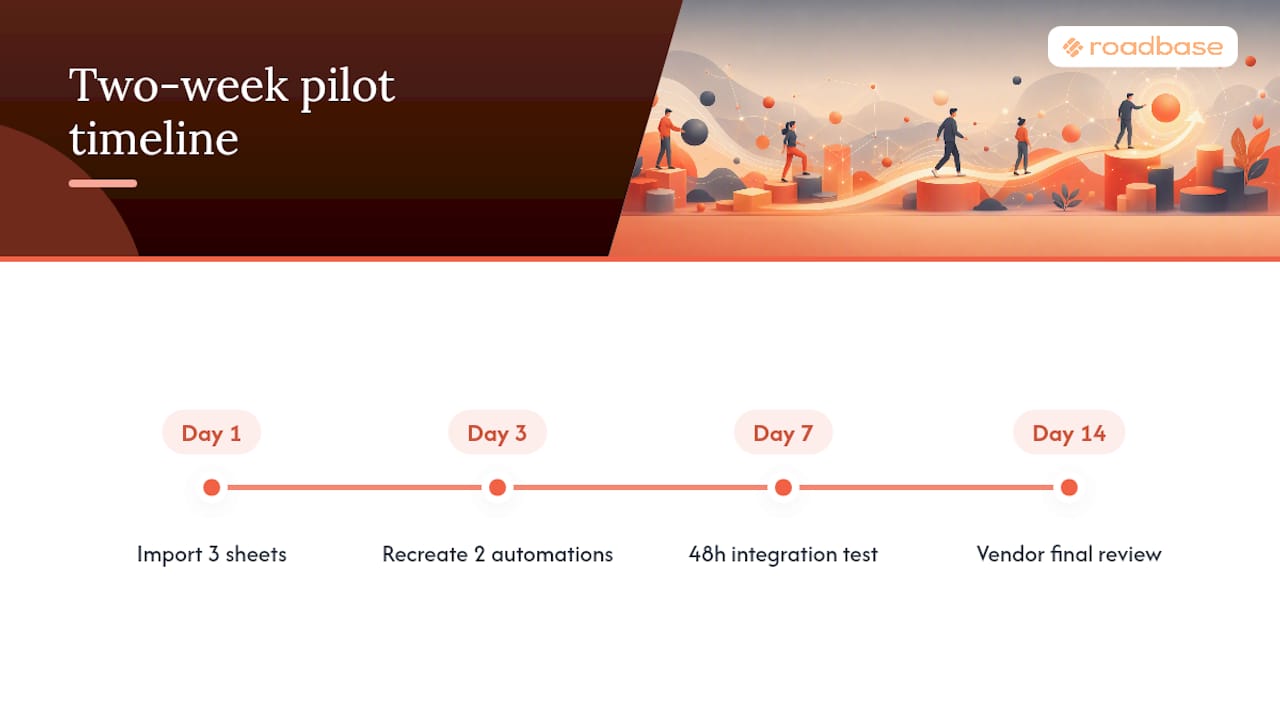
A pilot can expose those differences. Try representative sheets, an important automation, and the integrations your team depends on. The following illustration offers a two-week pilot plan that you can adapt to your data, team, and approval process.
How Do You Migrate Data Out of Smartsheet Safely?
Begin with an inventory: active sheets, reports, formulas, cross-sheet references, attachments, automations, owners, and integrations. Mark the pieces that people rely on to make a decision or trigger a handoff. Those deserve deliberate testing in the new system.
- Export a small, representative batch before moving the whole workspace.
- Compare values, formulas, formatting, and references with the originals. Smartsheet's Excel export does not preserve its formulas, and attachments are excluded, so plan separate handling for both.
- Import the sample into the candidate tool and rebuild the relationships and rules that matter.
- Test permissions and integrations with the people who use them.
- Record gaps, assign owners, and choose a cutover only after the sample is accepted.
An export file is a starting point, not a working replacement. A dashboard may need to be rebuilt, a formula may need a different expression, and an attachment may need its own migration path. Keep the original workspace available for comparison while your team validates the new one.
Pro Tip: Test your critical integrations while the sample is still small. A calendar, webhook, or billing handoff that behaves differently can change which candidate is viable.
The time required depends on the actual sheets, links, attachments, rules, approvals, and people involved. Scope the migration from an inventory and sample rather than assigning a standard duration to every team.
What Questions Should You Ask Before Switching Tools?
Write a short decision rubric around the jobs you identified at the start. Give more weight to a requirement when losing it would stop work or force a second tool. Then ask every finalist the same practical questions:
- What can we export if we leave, and in what format? What happens to attachments and linked data?
- Which record, automation, user, and reporting limits apply to the plan we need?
- Can we reproduce our most important approval, notification, and integration flows?
- What support commitment is written into this plan?
- Which security evidence can you provide for our procurement requirements?
- Can the tool handle a realistic sample of our records with acceptable responsiveness?
Request a live demonstration and written plan details for any answer that matters to the purchase. A pricing page or a short demo cannot tell you whether your existing work will transfer cleanly.
Why Quoting-First Tools Change the Replacement Equation
For some creative teams, the problem starts before a task reaches a board. A packaging brief might mention three SKUs, then reveal different production artwork and approval needs for each one. If those hours, roles, and assumptions are scattered across notes and a separate price sheet, the team has to reconcile them before it can send a useful proposal.
A quote-first workflow places the proposed phases, tasks, hours, costs, and price beside one another for review. That makes the reasoning behind a quote easier to inspect and adjust. The team checks the brief, assumptions, and inputs to choose a workable scope and target margin.
Roadbase supports that sequence. Paste the brief or attach a PDF, review its editable draft, adjust the role hours and costs, and export the reviewed plan and quote as a proposal PDF. If the work proceeds, the project can retain its task structure, statuses, and tracked hours so the team can compare actual task time with its estimates. Relevant past estimate-versus-actual data may inform a later draft when enough linked task time exists, but each new draft still needs review.
That path is useful when the quote is the bottleneck. If your team primarily needs complex connected data, organization-wide capacity, or invoicing operations, use the corresponding category as your starting point.
What This Comparison Gets Right (And What Most Guides Miss)
A long vendor list can hide the first decision: which job are you buying the tool to do? A database and a PPM platform can both appear on a Smartsheet alternatives page while serving very different teams.
Define the job in one sentence before booking demos. For example: "We need to see production capacity across six client accounts," or "We need to turn packaging briefs into reviewed estimates before work begins." Then test each candidate with the same piece of real work. That will tell you more than a generic feature count.
If Smartsheet already supports that job well, staying put may be the sound choice. If it doesn't, choose the category that addresses the actual gap, and verify the move with a small sample before committing the whole team.
-- Nicolas Robertson
Ready to Replace Smartsheet for Quoting and Delivery?
Have a real brief, notes, or PDF waiting to be priced? Try that project in Roadbase. Review the draft phases, roles, hours, costs, and assumptions, adjust what your team knows, then see whether the resulting proposal PDF makes your quoting process clearer.
Try one real brief in Roadbase
For creative freelancers, small agencies, and software consultants, that one-project test is a practical way to judge a quote-first workflow. If the work goes ahead, the project can carry its tasks into status updates and tracked-hour comparisons.
Sources
Further reading for building a shortlist and comparing categories; check current features, limits, and prices with each vendor before deciding:
- 10 Best Smartsheet Alternatives I've Tried In 2026 (The Digital Project Manager)
- Smartsheet Competitors: A Practical Comparison for Teams Ready to Switch
- How to evaluate project management tools (Builtin)
- Grist: A Smartsheet alternative for connected data
For an example of comparison criteria in another software category, see SendSync's comparison of Freshdesk alternatives.
FAQ
Does Microsoft have anything like Smartsheet?
Yes, depending on the job. Microsoft Planner has a grid view for plan tasks, and Microsoft also offers portfolio features in premium Planner plans. Compare the particular plan, views, automations, and reporting you would use with your Smartsheet workflow rather than assuming either product is a direct copy.
Is Smartsheet just Excel?
No. Its spreadsheet-like grid sits alongside project collaboration, reports, dashboards, and automation. The familiar layout can be useful, but it does not make the two products interchangeable.
What are the downsides of using Smartsheet?
The downsides depend on your plan and workflow. Check the limits and performance of the sheet or table view you use, and test any complex formulas, cross-sheet references, and automation rules. Teams whose main pain is building a project quote from a brief may also want to compare a quote-first workflow.
Which is better, Google Sheets or Smartsheet?
Choose by the work. Google Sheets can be enough for a simple shared list or calculation. Smartsheet offers a project-oriented grid with additional views, reporting, and automation. Test the collaboration and controls your team needs before moving a live process into either one.
What's the best Smartsheet alternative for a small creative agency?
There is no single best category. If your team needs connected custom records, start with databases; for multi-project task delivery, start with PM suites; for billing operations, inspect PSA tools. If your recurring problem is turning client briefs into reviewed plans and quotes, test a quote-first workflow with one real project.