

Resource Leveling: How It Works, Techniques and Examples

Resource leveling adjusts a schedule around the people actually available to do the work. Tasks may move later, and the project end date may move too. For a creative studio, the practical question is whether a designer with 32 project hours available can really cover 55 hours of assigned work in one week.
This guide explains what leveling is, how it differs from resource smoothing, which techniques work, and how to set up the calendars that make it possible. The examples come from agency and freelance work: design, copy, development, video.
TL;DR
- Resource leveling gives resource limits priority, even if the end date has to move. Resource smoothing evens out demand while keeping the completion date.
- Check the deadline, available float, dependencies and real capacity before choosing which work to move.
- The five approaches below include schedule changes and broader resource optimization choices. Added help or changed deliverables may affect cost, quality or scope.
- Use each person's actual working pattern, time off and other commitments when checking capacity.
- Task effort and role estimates are the starting point; a person-level availability check turns them into a feasible schedule.
Table of Contents
- What resource leveling means in project management
- Resource leveling vs. resource smoothing
- A worked example: a brand refresh with one designer
- Resource leveling techniques that work for creative teams
- Setting up resource calendars
- How to level resources: a step-by-step process
- Why spreadsheets struggle with leveling
- Our perspective on leveling and estimating
- From a messy brief to a reviewable plan with Roadbase
- Common mistakes to avoid
- FAQ
- Sources
What resource leveling means in project management
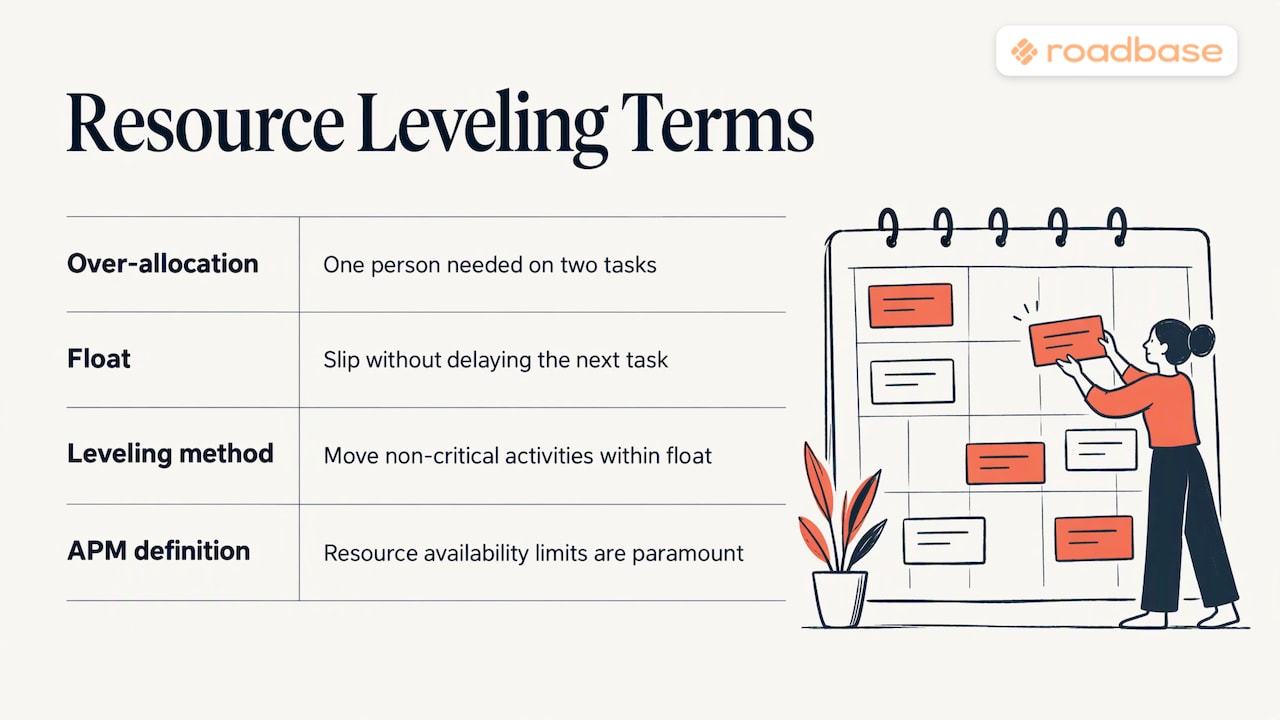
Every project has tasks, dependencies and people who do the work. When the same person is assigned more work than their available hours allow, the schedule needs another look. Resource leveling gives that availability limit priority and adjusts task timing as needed. The Association for Project Management describes leveling as the approach used when resource availability limits are paramount.
Float is the time an activity can move without delaying a successor or the project finish. Moving work within float may solve an overload while preserving the date; if it cannot, a resource-constrained schedule may finish later. The distinction matters more than the label on a scheduling chart. For further reading on formal methods, see the 2012 resource leveling paper and the 2018 resource leveling paper; neither is needed to establish the practical definition here.
When creative teams need it
Look closely at capacity when a senior designer or developer is assigned across several briefs, revision rounds cluster in one week, or a freelancer has promised overlapping launches. A peak in assigned hours followed by a quiet week is a prompt to compare the work with the person's actual availability. The chart alone cannot tell you which task is safe to move.
Resource leveling vs. resource smoothing
The two methods answer different scheduling questions. The APM distinction is useful here: smoothing protects the completion date; leveling puts resource limits first and may extend the schedule.
| Resource leveling | Resource smoothing | |
|---|---|---|
| Main constraint | Available people or equipment | Agreed completion date |
| End date | May move | Stays fixed |
| Typical adjustment | Reschedule work to fit available resources | Move eligible work within available float |
| Useful when | The current demand exceeds real capacity | There is enough schedule flexibility to reduce peaks |
The Rework explainer offers another comparison, while APM notes that a mixture of both can be useful. A resource constraint can also affect which activities drive the finish date, so revisit dependencies after a change.
Which one first?
Start with the actual constraint. With a fixed event launch, moving eligible tasks inside their float may reduce the peak without changing that date. If capacity still does not fit, discuss a change in resources, scope or deadline rather than assuming the schedule can absorb it. With a movable date, leveling may be the clearer plan from the outset.
A worked example: a brand refresh with one designer
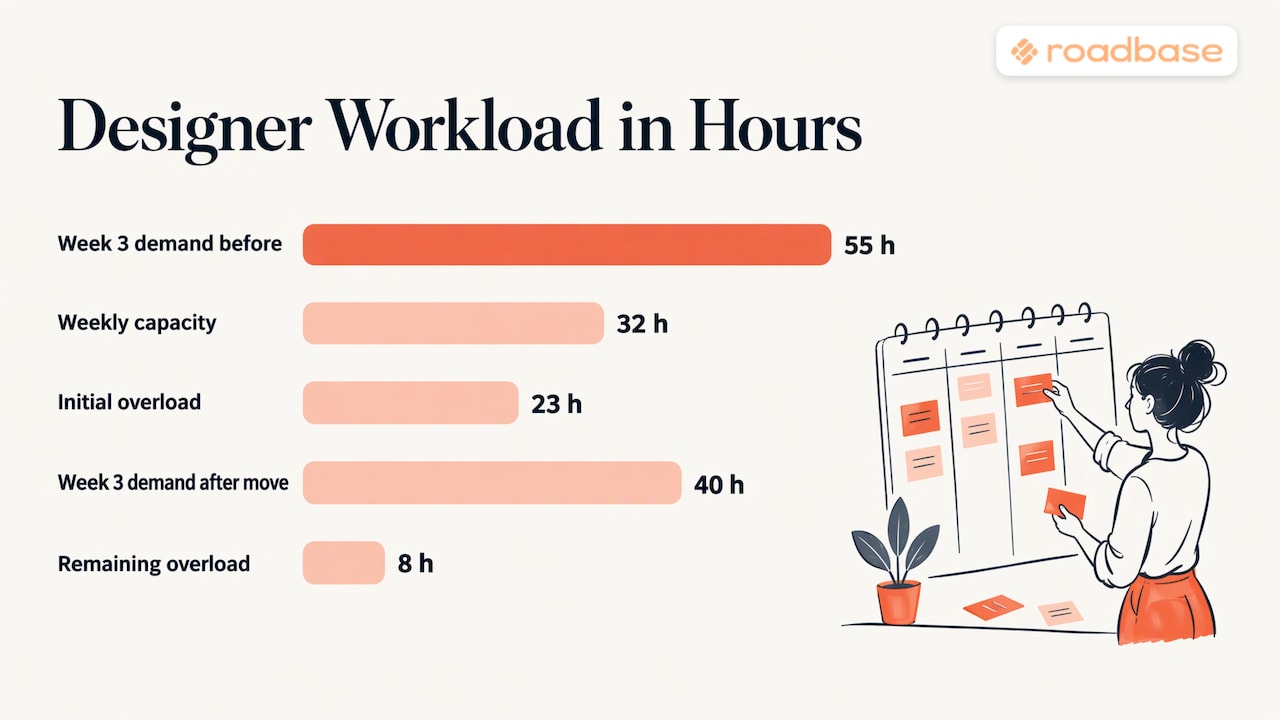
These numbers are illustrative. A small studio has a brand refresh and a website redesign underway, both using the same senior designer. Assume the designer has 32 project hours available in each of weeks 3 and 4, after other commitments.
Before adjustment: Week 3 has 30 hours of brand guidelines layout and 25 hours of homepage design. That is 55 hours against 32 available, an overload of 23 hours. Week 4 already has 16 hours of illustration work assigned to this designer, leaving 16 hours of capacity before any move.
Use available float: Assume the guidelines layout can be split and 15 hours can move to week 4 without delaying its successor. Week 3 falls to 40 hours, still 8 above capacity. Week 4 rises from 16 to 31 hours, leaving 1 hour. The move is feasible in week 4 under these assumptions, but it has not solved week 3.
Resolve the remaining overload: If 8 hours of homepage work can be split and moved to a later week with at least 8 free designer hours, week 3 reaches its 32-hour limit. Check when the completed homepage is needed before promising a finish date; the moved work may delay a dependent task or launch. The CSU Ohio project management text shows how rescheduling around limited resources can affect the finish date.
There are other choices to discuss. If the designer really owns the week 4 illustration task and a qualified illustrator can take it, that transfer frees 16 designer hours there, subject to cost and handoff. Reducing a homepage variation changes the agreed deliverables and requires the client's decision. Those are resource or scope interventions, not the same-resource date shift itself. The CSU example reports a three-day delay in its own schedule; this studio example cannot support a precise delay without daily availability and dependency dates.
Resource leveling techniques that work for creative teams
APM's resource optimization guidance describes several ways to respond to a resource limit. The first two mainly change the timing of existing work; the others can change staffing, assignments or the agreed work itself.
1. Delay work that can move
Check float and dependencies before shifting a secondary task into a quieter period. An internal asset library may move more easily than artwork needed for a fixed launch. Recheck the receiving week so the overload does not simply travel.
2. Spread effort over a longer duration
A 20-hour task could take two weeks at 10 hours per week instead of one week at 20. Total effort stays 20 hours. This helps only when the later hours fit the person's capacity and the longer task does not block a needed successor.
3. Add resources to earlier work
Bringing in an appropriate contributor can remove a bottleneck, but it changes the resource and often the cost. A copywriter who can complete approved messaging earlier may let design start with better inputs. Check onboarding and review time before assuming the added person saves time.
4. Redefine who performs an activity
In APM's resource optimization sense, changing an activity's scope can mean assigning suitable work to an underused person. For example, a production designer might take a set of routine adaptations from a senior designer after the system is approved. The deliverables remain; the assignment changes. Reducing the number of deliverables is a separate scope decision to agree with the client.
5. Change the specification by agreement
If the team and client agree that a rough animatic answers the decision at hand, it may replace a polished motion test at that stage. That is a change to the work requested, with quality and approval implications. Record it explicitly rather than hiding it inside a rescheduled task.
Watch your date constraints
Pinned dates reduce room to move tasks. Project Plan 365's constraints lesson illustrates how one scheduling tool handles date constraints; apply the general lesson carefully in your own tool. An event date may be genuinely fixed, while intermediate task dates often deserve another look.
Setting up resource calendars
A capacity check is only as useful as its availability inputs. Record each person's working pattern, time off, part-time arrangement and commitments on other projects. Leave room for admin, meetings and review work rather than treating every working hour as production time.
In Microsoft's project tooling, for example, resource working hours can be set by individual rules or a calendar template. In any planning setup, compare the reviewed task schedule with each person's availability before committing dates.
A practical setup checklist
- Choose the real working pattern. Start with the days and hours this team actually works, including each contractor's arrangement.
- Record exceptions. Add local and company holidays, planned time off and known conference or travel days.
- Account for shared commitments. Include other client work and nonproject time before calling the remaining hours available.
- Check individual capacity. A person with 40 working hours and 8 hours of meetings and admin has at most 32 hours left for the planned project work, before other assignments.
- Keep the calendar maintainable. A practitioner discussion recommends standardising working patterns where practical. Use the detail you can keep current.
The same Project Online calendar discussion shows that software may resolve project and individual patterns differently. Check your own tool's rules before trusting a displayed capacity number.
How to level resources: a step-by-step process
- List tasks, dependencies and effort by role. Break work into enough detail to see which specialist is needed and when. Include review rounds.
- Assign people and check real availability. Compare each person's total assigned hours across projects with their working pattern and other commitments.
- Identify flexible work. Note float, handoffs and fixed dates. A critical-path view helps reveal where a move could affect the finish date.
- Try eligible moves within float. Recheck both the week work leaves and the week it enters.
- Resolve the remaining overload. Move work beyond float if the date can change; otherwise evaluate qualified help, reassignment or an agreed scope change. Record cost and approval implications.
- Agree the tradeoff. Show the people affected which dates, assignments and deliverables change.
- Keep a reviewed baseline. PMI's scheduling discussion supports evaluating a resource-constrained schedule before setting baseline dates.
- Recheck when work changes. Late feedback, new briefs and revised estimates can change the load. Repeat the capacity comparison rather than assuming yesterday's plan still fits.
Why spreadsheets struggle with leveling
A spreadsheet can be a useful capacity check for a small team. One sheet can total a person's assigned hours by week and compare them with available hours. Keep it if the team can maintain the inputs and review the consequences of each move.
As projects and dependencies multiply, manual updates become more demanding: a moved task may change several later dates, and the same person may appear on multiple sheets. Spreadsheets remain useful when the team can maintain them. A 2018 resource leveling research paper is further reading on formal models, rather than a requirement for a studio capacity sheet. For wider scheduling context, see this project management tools for event planners roundup. Our comparisons of project forecasting tools for creative teams and TeamGantt alternatives for creative agencies cover other tool choices.
Our perspective on leveling and estimating
Capacity problems can begin in the estimate. A line that says "design: 60 hours" does not show which person or role will do the work, in which phase, or how much revision time is included. A useful first step is to make those tasks, roles and hours visible, then compare the proposed timing with each person's actual commitments.
Roadbase can help turn a brief into an editable draft of phases, tasks, roles, hours and a quote. Review and adjust the draft before using it to promise a date. After approval, tracked hours can be compared with estimates as work progresses; that comparison makes variance visible for a later planning conversation.
From a messy brief to a reviewable plan with Roadbase
If you have a real brief, notes or a PDF, bring it into Roadbase to draft phases, tasks, roles, estimated hours and timing. Review the plan and quote, then compare each person's proposed work with their availability across commitments before agreeing dates. You can export the reviewed plan and quote as a proposal PDF.

Once work is approved, keep tasks and tracked hours with the project and compare actual hours with estimates. You can visit Roadbase to start, or see Roadbase pricing for current plan details. Our guide to role-based estimating helps set hours by task and role; change request templates help when the agreed work changes.
Common mistakes to avoid
- Planning at 100% capacity. Allow for meetings, admin and other commitments before setting project hours.
- Ignoring revision rounds. Feedback loops are real work. Estimate them as tasks.
- Leveling once and forgetting. A new project can undo last week's plan.
- Moving tasks without checking dependencies. Review available float and successor dates before committing to a new schedule.
- Hiding the tradeoff. If a revised schedule changes a date, show the calculation and discuss the options.
FAQ
What is the difference between resource leveling and resource smoothing?
Leveling adjusts the schedule to respect resource limits and may extend the end date. Smoothing redistributes eligible work while keeping the end date. A project may use a mix of both as its constraints change.
What is an example of resource leveling?
If two tasks need the same designer in one week and exceed that person's available hours, move eligible work to a week with verified capacity. Then check successors and the finish date. The CSU Ohio text includes a three-day delay in one worked case; the delay in another project depends on its own hours and dependencies.
Does resource leveling always delay a project?
No. Sometimes tasks can move within existing float while the end date holds. If the overload remains and the same limited resources must do the work, the finish date may move. Added help or a separately agreed scope change can create other options.
What do I need before I can level resources?
List the tasks, effort, roles, dependencies and required dates. Then compare each named person's assigned work with their real availability, including time off and commitments elsewhere. Recheck the schedule after each change.
Sources
- Mixed-integer linear programming for resource leveling problems (ScienceDirect, 2012; further reading)
- Resource leveling using normalized entropy and relative entropy (ScienceDirect, 2018; further reading)
- Resource Smoothing vs Resource Levelling (APM)
- What is resource optimisation? (APM)
- Resource Leveling vs Smoothing Explained (Rework)
- 8.5 Solving Resource Overallocation: Resource Leveling (CSU Ohio)
- Lesson 2: Constraints (Project Plan 365)
- Define resource calendars (Microsoft Learn)
- Working with Enterprise Calendars in Project Online (Wellingtone)
- Fundamentals of scheduling and resource leveling (PMI)
- 7 Best Project Management Tools for Event Planners in 2026