

Estimate vs Actual: What Project Managers Must Track
Estimate vs actual compares the cost or hours you predicted for a project with the results you record as work proceeds. The basic formula is Variance = Estimate - Actual. Turn that into a percentage by dividing the variance by the estimate and multiplying by 100. Review the comparison on a regular cadence that suits the pace and risk of the project, rather than waiting until close.
- Estimate = your predicted or budgeted cost before work starts
- Actual = the real recorded expenditure once work is underway or finished
- Action: compare the estimate and actual record at the same level of detail, then investigate differences that cross the review threshold your team has set for the project
Key Takeaways
Estimate vs actual tracking gives a project team a repeatable way to compare the approved baseline with recorded work while there is still time to discuss the difference.
| Point | Details |
|---|---|
| Know your formulas | Variance = Estimate - Actual; percent variance = (Estimate - Actual) / Estimate x 100. |
| Use EVM for clarity | CV = EV - AC and SV = EV - PV can separate cost differences from schedule differences when a team maintains the required WBS, schedule, and time-phased budget. |
| Set team-defined thresholds | Choose review ranges that fit the project's size, pace, and uncertainty; use them as prompts to look closer, not as universal rules. |
| Fix the process, not just the math | Use consistent categories, record work consistently, and document approved changes so the comparison remains useful. |
| Keep the plan and work connected | Roadbase can keep a reviewed project plan and quote connected to task/status work and tracked time, making estimated versus actual task hours visible. |
Table of Contents
- What Do Estimate, Actual, and Baseline Actually Mean?
- Why Track Both Estimated and Actual Costs?
- How Do You Calculate Estimate vs Actual Variance?
- How Do You Set Up an Estimate vs Actual Workflow?
- What Should You Do When Variance Shows Up?
- How Do You Close the Gap Between Spreadsheet Estimates and Accounting Actuals?
- How Far Off Can an Estimate Be Before You Act?
- A Project Manager's Quick Priority List
- Keep Your Estimates and Actuals in One Place
- Sources
- FAQ
What Do Estimate, Actual, and Baseline Actually Mean?
Confusion here is where misleading comparisons start. You cannot compare numbers clearly if different people use "the estimate" to mean different things.
Here's a working glossary:
- Estimate: the predicted cost or hours for a task, built before work begins.
- Actual: the cost or hours your team records for the work as it happens.
- Budget: the approved spending plan for a project or phase, which may include contingency.
- Baseline: the approved version of the plan and budget used as the reference point for future comparisons.
- Planned Value (PV): the budgeted cost of work scheduled to be done by a given date.
- Earned Value (EV): the budgeted cost of work actually completed by that date.
- Actual Cost (AC): the recorded cost of the work completed by that date.
- Change order: a documented adjustment to scope, cost, or schedule after the baseline is approved.
Two common sources of misleading reports are booking overhead as a direct cost and leaving relevant labor out of the actual record. Agreeing how the team will classify and record work before the comparison starts makes the result easier to interpret.
Pro Tip: Approve the baseline before work starts. If the original estimate changes, document why and keep the earlier reference available for comparison.
Why Track Both Estimated and Actual Costs?
Comparing estimate vs actual gives a team evidence to discuss how the planned work is unfolding. It does not settle every commercial question, but it can show where the original plan and the recorded work are separating.
Tracking both numbers can help a team:
- See whether the estimate still describes the work being delivered once labor, materials, and approved changes are recorded.
- Notice a meaningful difference early enough to investigate the task, phase, or assumption behind it.
- Build a useful record for reviewing similar work in a later estimate.
The comparison can serve as a leading indicator, not a lagging one when the team reviews it regularly and responds to the context behind a difference. The right cadence depends on the project's pace, the availability of recorded data, and the decisions the team needs to make.
How Do You Calculate Estimate vs Actual Variance?
Two formulas cover a basic estimate-versus-actual comparison:
- Variance = Estimate - Actual
- Percent variance = (Estimate - Actual) / Estimate x 100
A positive variance means the recorded amount is lower than planned. A negative one means it is higher. The percentage gives the team a shared way to judge the size of the difference against its own review threshold.
For larger or longer projects, Earned Value Management adds inputs that a raw budget-versus-spend comparison does not include. Microsoft's project guidance describes Planned Value (PV), Earned Value (EV), and Actual Cost (AC). EVM needs a work breakdown structure, schedule, and time-phased budget. From there:
- Cost Variance (CV) = EV - AC
- Schedule Variance (SV) = EV - PV
Say a phase was budgeted at $50,000 (PV), work worth $40,000 has been completed (EV), and the recorded cost is $48,000 (AC). CV is -$8,000, meaning the cost is higher than the value of the completed work. SV is -$10,000, meaning completed work is below what the schedule planned by that point. The team can then review the assumptions, progress record, and next decision together.
Pro Tip: Update the baseline when an approved scope change requires it. Keep performance differences visible rather than overwriting the reference point.
AACE International's guidance treats variance reporting as a project-defined practice. Its examples are useful context, but they do not make one percentage range right for every project.
How Do You Set Up an Estimate vs Actual Workflow?
Getting useful numbers is a process problem before it is a math problem. A practical sequence is:
- Build a baseline using a work breakdown structure or another consistent set of categories.
- Assign the estimate to the same tasks, phases, or categories the team will use for comparison.
- Record actuals consistently so hours and costs are captured at a comparable level of detail.
- Review the comparison regularly on a cadence that matches the project's pace and decision points.
- Investigate and document a meaningful difference, including any approved change to scope, cost, or schedule.
Three report views can be useful:
- Estimate vs actual by task, phase, or agreed category, so the team can see where a difference is occurring
- A project summary view for the overall comparison
- A trend or percent-variance view that shows how the comparison is changing over time
The useful cadence is the one that gives the project team current enough information to act on. A short review can work for a steady project; a faster-moving project may call for more frequent checks.
What Should You Do When Variance Shows Up?
Not every variance needs the same response. The goal is to understand the difference and decide what the team needs to do next.
Start with a data check:
- Confirm that the relevant hours and costs were recorded against the intended task, phase, or category.
- Check whether a documented scope or schedule change explains the difference.
- Review whether the original estimate used an assumption that no longer holds.
- Look for timing differences between when work occurred and when the related actual record was entered.
- Talk to the project lead. Numbers need delivery context.
From there, use the review thresholds the team has defined for the project:
- Within the team's tolerance? Keep monitoring the comparison.
- Beyond a review threshold? Investigate the relevant work and document the finding.
- Beyond an escalation threshold? Bring the owner or decision-maker into the discussion and update the forecast or approved plan when appropriate.
The response might be to document an approved change, adjust the sequence of a task, revisit a lower-priority deliverable, or clarify a supplier assumption. The right response comes from the project's facts, not from the percentage alone.
How Do You Close the Gap Between Spreadsheet Estimates and Accounting Actuals?
The common difficulty is structural: the estimate and the actual record use different categories, levels of detail, or update rhythms. That can create a difference that reflects mismatched records rather than project performance.
A few practices make the comparison clearer:
- Use agreed categories across the planning record and the actuals record where a comparison is needed.
- Make project- or task-based time recording part of the team's working routine.
- Check that material costs and labor are recorded at a level that can be compared with the baseline.
- Review the estimate versus actual view on a regular schedule and document the context behind a material difference.
If you are still stitching planning work together in spreadsheets, this breakdown of where spreadsheets stop working is useful related reading before the next proposal.
Pro Tip: Start with consistent time records. Clear actual hours give the team a more useful basis for comparing the work with its estimate.
How Far Off Can an Estimate Be Before You Act?
Projects rarely match an estimate exactly. The useful question is where a difference becomes important enough for this project to review.
AACE International's guidance says teams set thresholds for their own projects. It includes an illustrative stoplight convention: within +/-5% as green, from +/-5% to 20% as yellow, and beyond +/-20% as red. That illustration is not a universal 5/15 rule. A team should define a threshold that fits the work, the quality of its data, the size of the decision, and the amount of uncertainty in the baseline.
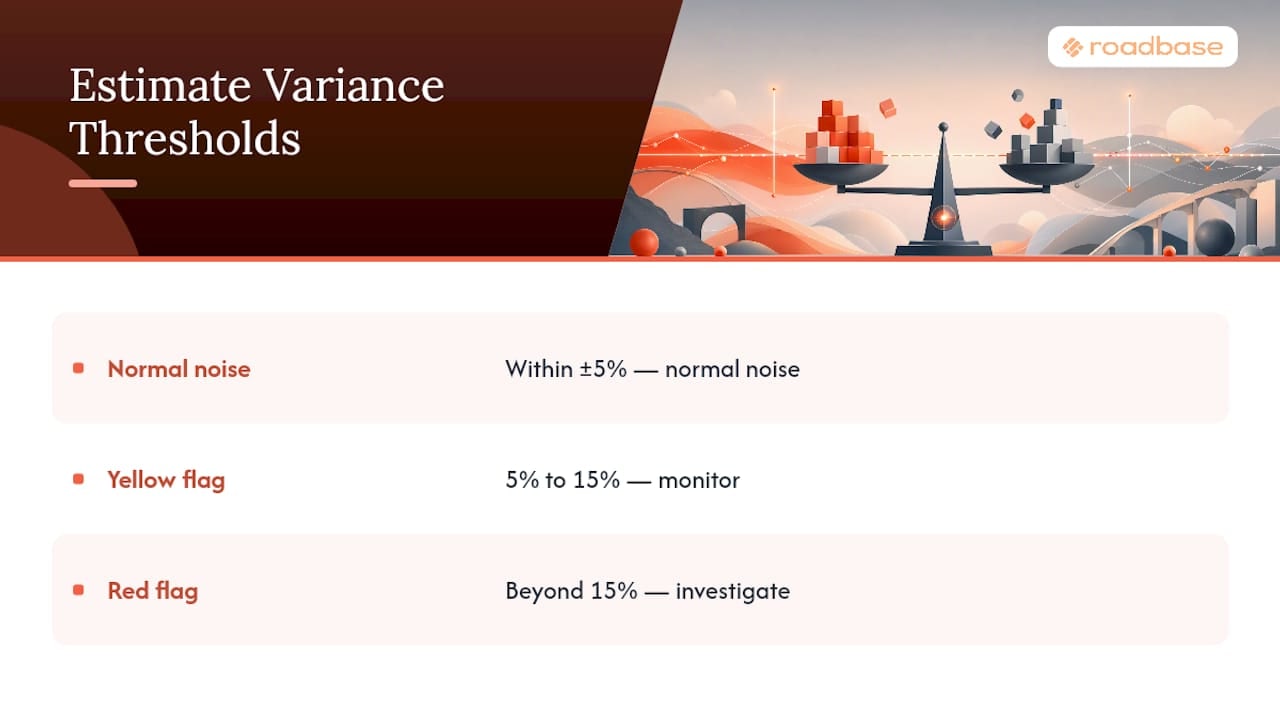
The chart can be read as a prompt to define and use a review convention, not as a prescribed threshold for every job. Differences can stem from incomplete labor records, overhead being classified differently, timing mismatches, approved scope changes, or an early estimate that needs a closer look.
A Project Manager's Quick Priority List

Use a short, regular review that fits the project's pace. Pull the comparison, sort for the differences that matter under the team's thresholds, and choose the items that need a conversation. For each one, record what changed, what remains uncertain, and the next owner or decision. Those notes give the next estimate more context than a percentage alone.
Keep Your Estimates and Actuals in One Place
If you have a real brief, notes, or PDF, paste it into Roadbase or attach the PDF to build an editable draft project plan and quote to review. Once the project is approved, keep the same phases and tasks connected to status updates and tracked time so you can compare actual task hours with the estimate.

Roadbase can start with a pasted brief or PDF and build an editable first draft of the work breakdown. Review and adjust the phases, tasks, roles, estimated hours, and quote inputs; price estimated hours by the roles doing the work, with costs and rates supplied by your team. You can also review labor, overhead, direct costs, contingency, and target margin behind the quote. After approval, carry the project into a simple status board, track time against the project or task, and compare tracked hours with the estimate while work is underway. With enough relevant, correctly linked task history, past estimate-versus-actual data can inform a later draft by role for review. For related reading on using past projects as context, see analogous estimating methods. If you want a reviewable plan and quote for the next project, try Roadbase.
Sources
- 86R-14: Variance Analysis and Reporting
- Integrate variance tracking into your project change management process - Microsoft Support
- Estimate vs. Actual Reports: The Weekly Habit That Saves Profit - Level Accounting
- Estimated vs Actual Costs - And Why You Need to Track Both
FAQ
What Is the Difference Between Estimate and Actual?
An estimate is the cost or hours predicted before work starts. The actual is the cost or hours recorded as the work happens, using the same level of detail needed for a useful comparison.
What Is the Difference Between Estimated and Actual Cost?
Estimated cost is the forecast made during planning or proposal work. Actual cost is the cost recorded for the work completed, then compared with the approved baseline.
How Far Off Can an Estimate Be?
There is no universal percentage that requires action. Set review and escalation thresholds that fit the project, then investigate a difference when it crosses one of those team-defined thresholds. AACE's +/-5%, +/-5% to 20%, and beyond +/-20% stoplight example is illustrative rather than a rule for every project.
How Do You Calculate Estimate vs Actual Variance?
Subtract actual cost from estimated cost to get variance, then divide that number by the estimate and multiply by 100 to get percent variance.
Why Do Estimated and Actual Costs Often Differ So Much?
Common causes include incomplete labor records, overhead classified differently, timing mismatches, approved scope changes, and estimates built without enough relevant project history. A consistent baseline and actuals record help the team investigate which of those conditions applies.
Recommended
- Wrike Alternatives for Project Managers: 2026 Guide
- How to estimate project hours before you send a quote - Roadbase Blog
- Analogous Estimating for Creative Quotes | Roadbase
- Milestones and Deliverables: Templates for Project Managers
- Capacity planning tools beyond Float
- Project forecasting tools for creative teams
- Agency capacity planning
- Parametric estimating for cost and schedule