

Lessons Learned Register: Template, Examples and Steps
A lessons learned register is a working record of what a team learns during a project: what happened, what may have caused it, and what to try next time. A team can add entries as work unfolds, review them at phase end, and make useful findings available for later projects. This guide gives you a practical template, worked examples, and a routine for putting the entries to use.
TL;DR
- For a small team, a project register and a cross-project repository are useful working conventions, though organizations may use the terms differently.
- Start with consistent fields for the event, observed impact, possible cause, recommendation, owner, and status; add dates and keywords so entries can be found.
- Capture useful observations during the work and at phase reviews, while details are fresh.
- Review an observation, try a change, and check what happened. Those are distinct steps.
- When a lesson affects a quote, record the relevant hours, costs, or revision assumptions if you have evidence for them.
Table of Contents
- What a lessons learned register is
- Register, repository and post-mortem compared
- When to record lessons
- What to include: a lessons learned template
- Lessons learned examples
- How to run the register in five steps
- Why registers fail
- Connecting lessons to estimates
- Our perspective
- From lessons to your next proposal
- Where to go next
- FAQ
- Sources
What a lessons learned register is
Capture lessons before closeout so the team can use them while work is still underway. A register can be a working log rather than a report written only after delivery.
The sixth-edition PMBOK Guide framed lessons learned within project knowledge work that continued throughout the project.
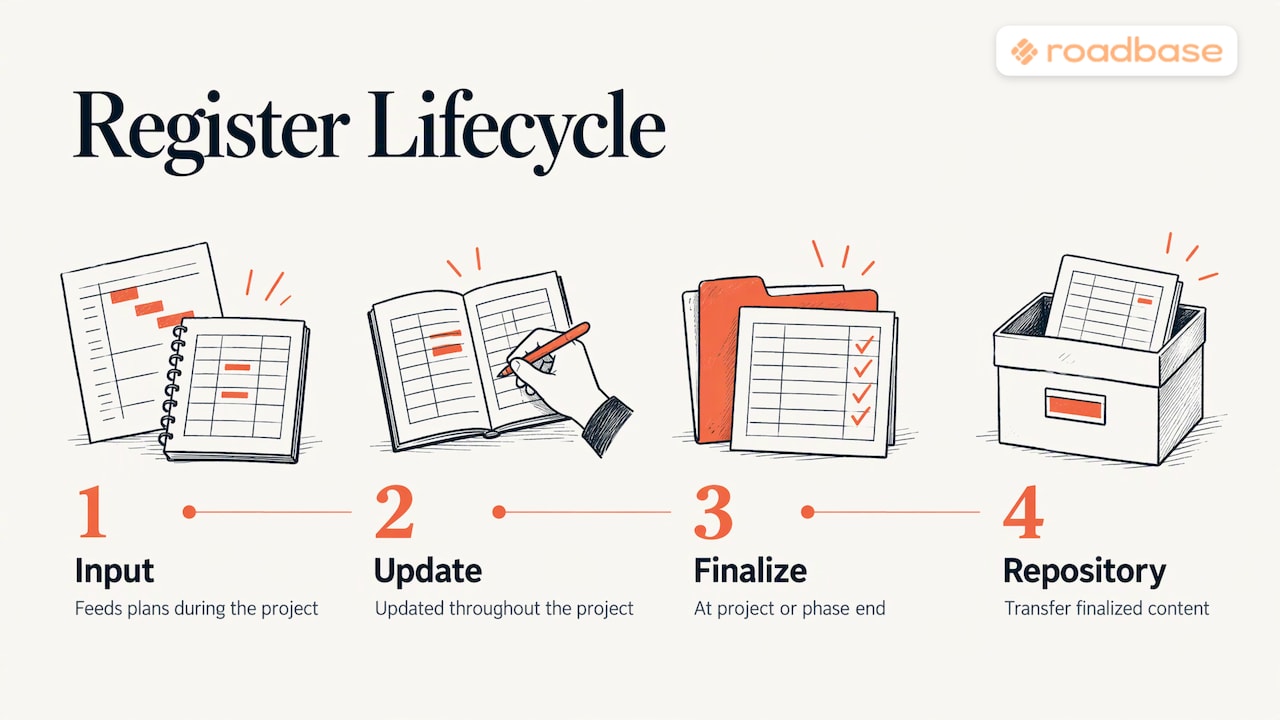
A PMI chapter presentation describes a register used as an input and updated as an output across project processes. At phase end, review the entries and make relevant lessons easy for the next team to find.
The names vary: "log," "template," "register," or "document." A table with one row per observation is a simple format for a small team. The useful part is the review and retrieval routine around it.
Register, repository and post-mortem compared
Three terms get mixed up. Here is a practical way to organize them for a small studio; one practitioner comparison uses similar language. These are practical working labels for this article.
| Lessons learned register | Lessons learned repository | Post-mortem | |
|---|---|---|---|
| What it is | Working record of lessons from a project | Shared place to find lessons across projects | Review meeting or account of what happened |
| When | During the project and at phase reviews | As useful lessons become available | After a phase, project, failure, or incident |
| Scope | One project | Many projects | One event or the whole project |
| Typical output | Register entries | Searchable records | Timeline, root causes, actions |
A simple way to remember the convention: the register is the working notebook, the repository is the shared library, and a post-mortem is one kind of review that may produce entries. A review is useful for discussion; the register makes its findings easier to revisit at the next kickoff.
When to record lessons
Closeout is useful, but waiting until then can waste details. PMI also recommends capturing lessons before closeout: at the end of a wave, phase, or stage, or in real time. That gives the team a chance to act while the work is still underway.
For a creative project, a practical rhythm looks like this:
- Kickoff: read the register entries from similar past projects before you scope.
- End of each phase: set aside a short review. One person can facilitate while the team records the observations worth keeping.
- When something changes: make a note while the details are fresh. A third revision round, a late client asset, or a vendor delay is easier to describe now than next month.
- Closeout: review the entries, check what evidence supports them, and place useful findings where the next project team can find them.
PMI advises project leads to keep promoting lesson capture. A lead who adds a concrete entry gives the team an example to follow.
What to include: a lessons learned template
Consistent fields make entries easier to compare and find. PMI discusses category, lesson learned, action taken, rationale, root cause and keywords as useful information. Choose fields your team will actually fill in, then use keywords for retrieval.
Here is a template you can paste into a spreadsheet or a project tool:
| ID | Date logged | Phase | Category | What happened | Impact | Root cause | Recommendation | Owner | Status | Keywords |
|---|---|---|---|---|---|---|---|---|---|---|
| LL-001 | Open / Applied / Closed |
A few notes on the columns:
- ID and date: a unique identifier lets you reference an entry in a kickoff deck or a change request.
- Category: keep the list short. Schedule, budget, scope, stakeholder, quality and tooling are possible labels. A published template uses technical, financial, schedule, stakeholder and quality.
- Impact: record measured hours, cost, or days when available. If you do not yet have a number, describe the observed effect without inventing one.
- Root cause: write a possible cause and check it against the brief, schedule, or team account. A vague label such as "poor planning" offers little to investigate.
- Recommendation: make the action clear enough to try. A practitioner template suggests specific and testable recommendations: what to do, when, and who owns the next step.
- Status: distinguish a recorded observation from a change tried and a result checked. More on that below.
In a NASA example, a lesson record includes evidence of recurrence and supporting documents. For a brand-identity project, a link to the brief, signed estimate, or decision thread may be enough to let the team check the entry later.
Lessons learned examples
The four entries below are invented teaching examples, written for a creative studio. The figures are illustrative, and the possible causes would need checking against project records before a team treated them as findings.
Example 1: Scope and revisions
- What happened: The website design phase used five revision rounds. The estimate assumed two.
- Impact: Suppose 18 hours went unbilled. Compare the recorded hours and project costs before estimating any margin effect.
- Possible cause to check: The proposal listed "revisions" without a number, and an approver joined after kickoff. Review the approval history to see which change led to each extra round.
- Recommendation: State the number of revision rounds per deliverable in every proposal, and name all approvers in the kickoff call. Price extra rounds as a listed line item.
Example 2: Dependencies
- What happened: Copy arrived three weeks after the agreed date, and the design phase sat idle.
- Impact: The phase might finish three weeks later; record any actual rescheduling or restart cost separately.
- Possible cause to check: The schedule may not have shown client content as a dated dependency. Check whether other work could have continued.
- Recommendation: List client-supplied assets that block a phase as dated dependencies. Agree in advance when a delay calls for a schedule update or change request.
Example 3: Vendor estimate
- What happened: In this example, data cleanup took longer than a freelance developer expected. A published template also uses vendor data cleansing as an example of a delay.
- Impact: Suppose the build phase finished two weeks later than planned. Check task logs to separate cleanup time from other delays.
- Possible cause to check: The team accepted a single-line estimate without a task breakdown; review whether the source data was available to inspect.
- Recommendation: Ask the vendor to break out data cleanup and other uncertain tasks before the build starts, then review the assumptions together.
Example 4: A positive lesson
- What happened: A studio added a short weekly client review during a campaign.
- Impact: In this example, the final phase had no rework rounds. Compare it with similar campaigns before crediting the meeting alone.
- Possible cause to check: Earlier feedback may have surfaced decisions before final production.
- Recommendation: Try a weekly review on a longer campaign and record whether it catches decisions earlier.
Each example connects an observation with a possible cause and a next action. Check the cause before changing a standard process. PMI includes both positive and negative experiences, so keep useful practices as well as problems.
How to run the register in five steps
PMI describes the core process as identify, document, analyze, store and retrieve. Here is how that maps to a small team's week.
- Identify. Anyone on the team can raise a lesson. Keep the barrier low: a one-line note is fine, and the owner fills in the rest.
- Document. Move the note into the register with enough context to understand it. Add measured figures and links to the relevant records when available.
- Analyze. Ask what evidence supports the proposed cause and what else might explain the result. Choose an action the team can try, rather than assigning blame.
- Store. At a phase review or closeout, make the useful entries available in a shared location. Give them searchable keywords.
- Retrieve. At the next kickoff, search for similar work and decide which entries should inform the plan and quote.
The chain matters: a note that nobody analyzes or retrieves has little chance of informing later work. PMI discusses how capturing information without the later steps limits organizational learning.
Add a review step
The U.S. Army's approach calls for observations to be reviewed for validity, followed by action and assessment. For a small team's register, you could use three suggested statuses: Open (recorded for review), Applied (a change has been tried), and Closed (the team has checked what happened). These are the article's suggested statuses.
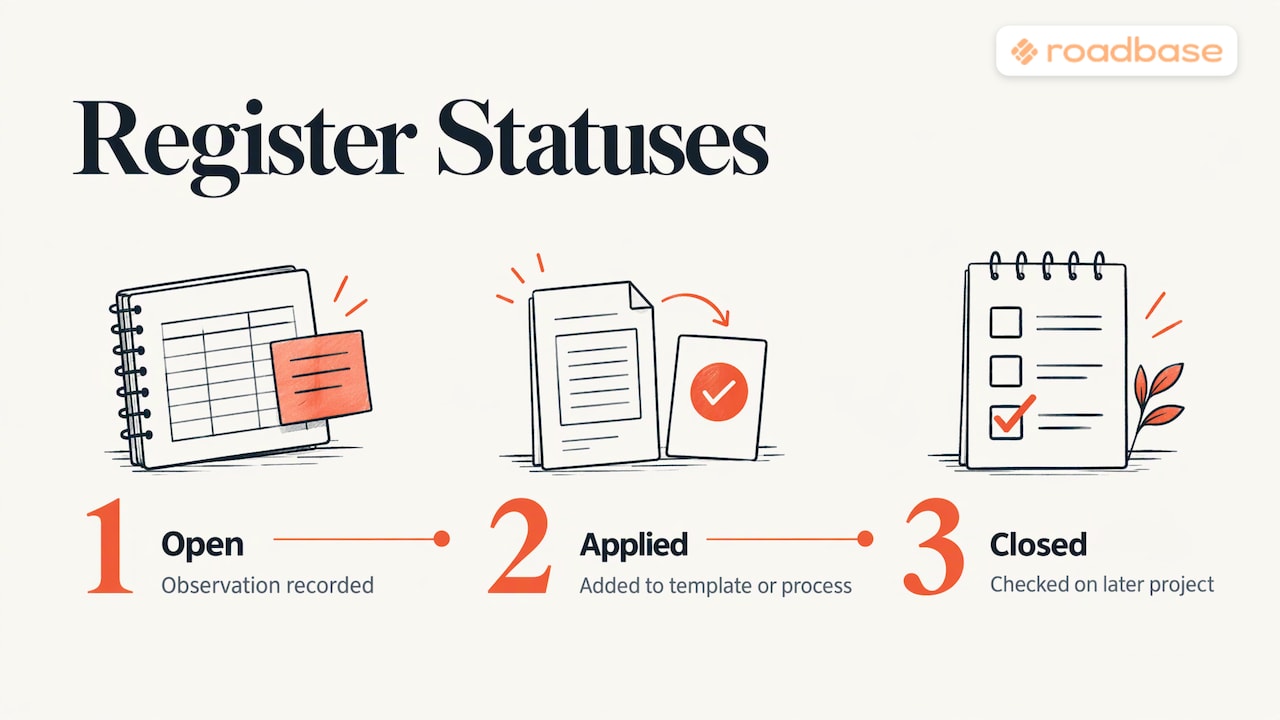
NASA describes a lifecycle of collecting, recording, sharing, and applying. A status and owner can help a small team see which observations have led to a tried change and which results still need checking.
Why registers fail
The usual problems are simple:
- Nobody returns to it. A practitioner warns that a register left untouched loses its value. Put a short check-in on the phase review agenda.
- Vague entries. "Communication was poor" gives the next team little to work with. Record the decision, timing, people involved, and any measured effect.
- No owner. Name the person who will test or review a recommendation, so it does not sit without a next step.
- Nothing connects to the next project. Search the register at kickoff, including before you scope and price similar work.
- Only what fits in a table. Written entries can miss tacit knowledge, as the same author notes. A short conversation can surface context worth adding.
The name of the framework matters less than whether the team can find and use an entry. A practitioner overview discusses learning from experience across a project. For a small studio, make space to capture observations, share the useful ones, and revisit them when similar work begins.
Connecting lessons to estimates
For freelancers and agencies, some lessons affect time, cost, or scope. When one does, use the evidence to review a later estimate. Other lessons may improve handoffs or approvals without changing a number. Useful places to apply an entry include:
- Hours per task: if a logo phase took 22 tracked hours against 14 estimated, examine the eight-hour gap before revising assumptions for similar work.
- Risk and contingency: repeated causes may deserve a closer look in your risk register.
- Scope boundaries: revision and approval lessons can inform the scope and change request templates.
- Task structure: missed steps may belong in your work breakdown structure.
- Budget lines: documented omitted costs can inform your project budget breakdown.
- Client fit: a pattern of overruns may warrant a client profitability review.
At closeout, ask which assumptions deserve another look. An unchanged estimate may be reasonable; write down why if the register raised a relevant question.
Our perspective
A useful lesson needs a path back into the next project. A short register that people open at kickoff can make that path easier to follow.
When a lesson changes your assumptions, bring those revised hours, roles, or scope boundaries to the next quote. Roadbase can turn a real brief into an editable draft plan with phases, tasks, roles, hours, and pricing for you to review. Cost and margin calculations sit beside the planned work; the choices about the assumptions remain yours.
Keep the register where your team can find it. Write recommendations as actions, then check the relevant figures before you change a quote. Once work begins, comparing tracked hours with estimated hours can give the next review a clearer starting point.
From lessons to your next proposal
Have a real brief and a few reviewed lessons to apply? Put your revised assumptions into the next quote. Paste the brief or your notes into Roadbase, then review and adjust its editable draft plan with phases, tasks, roles, hours, and pricing. You can export the reviewed plan and quote as a proposal PDF. As the project runs, track time against tasks and compare those hours with your estimate.
See the current plans on the Roadbase pricing page. You can also Visit Roadbase to start with your brief.
Where to go next
If your register keeps pointing to the same issues, these pages cover the follow-up work: milestones and deliverables to tighten definitions of done, and roles and responsibilities to remove ownership gaps.
FAQ
What is the difference between a lessons learned register and a repository?
For a small team, a register can be the working record for one project, while a repository is the shared place to find lessons across projects. Review entries at phase end and make useful ones available for future work. Organizations may use these labels differently.
How do you document lessons learned?
Use a table with consistent fields such as ID, date, phase, what happened, observed impact, possible cause, recommendation, owner, status, and keywords. Add entries during the project, review them at phase end, and link to evidence when available.
When should you record lessons learned?
PMI recommends capturing them before closeout, at the end of a phase or stage, or in real time. A short phase review plus notes made while the details are fresh can work well for a small team.
Is a post-mortem the same as a lessons learned review?
A post-mortem is a type of review, often used after a project or incident. A lessons learned review can happen during a phase or at closeout and may cover successes as well as problems. Either can produce entries for a working register.
Sources
- Historical background (third-party copy): PMBOK Guide 6th Edition.
- PMI-DHC presentation, Growing Knowledge in PM
- Neural Project Institute, Lessons Learned in Project Management
- PMI, Right from the start
- PMI, Applying lessons learned
- PMI, Lessons learned
- Mastt, Lessons Learned Template
- Project Management Formula, Lessons Learned Template
- PM Resource Hub, Initial Lessons Learned Register Template
- NASA, Improving Spacecraft Ground Operations
- NASA, Lessons Learned
- Department of the Army Pamphlet 11-33
- Mudassir Iqbal, Lessons Learned Register and Repository