

Project Closing Checklist: 12 Steps to Close Client Work

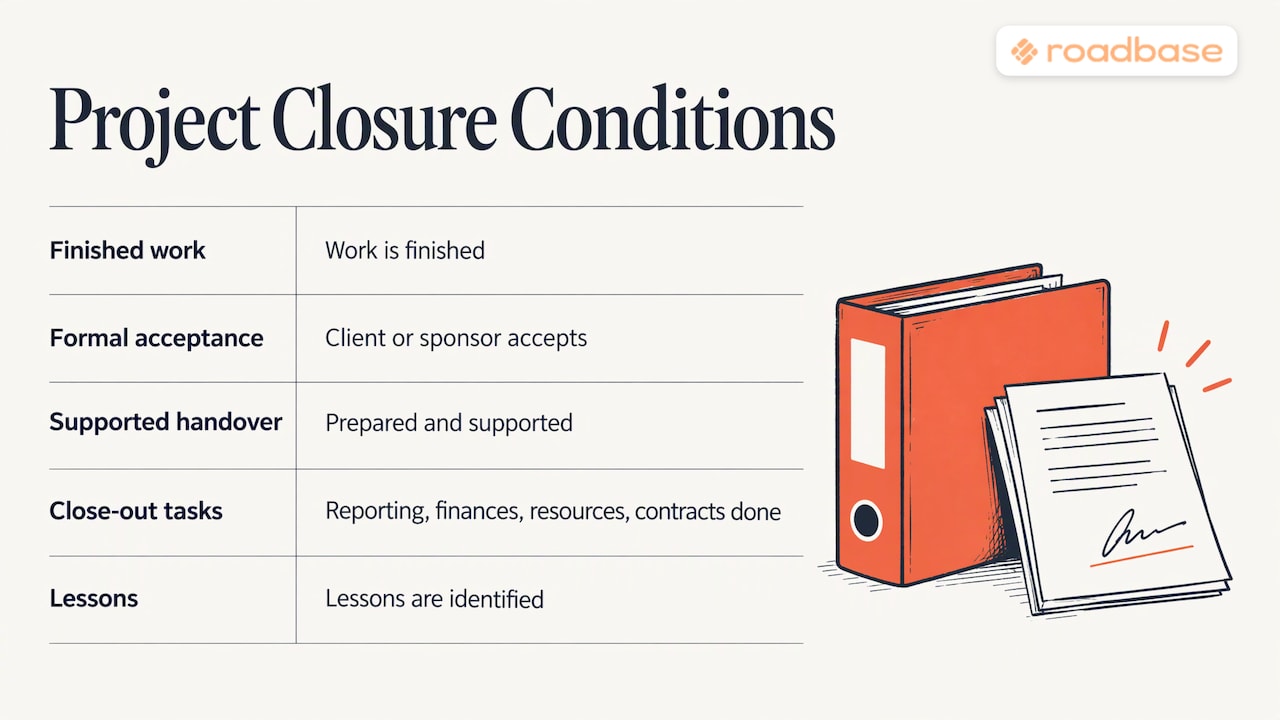
A project is closed when the work is finished, the client has formally accepted it, the handoff is done, the money is reconciled, and what you learned is written down. Everything else on a closing checklist serves one of those five outcomes. If you planned the work and tracked time against tasks in Roadbase, you can compare estimated and tracked hours when you close.
This guide gives you the checklist, an order you can adapt to the engagement, a closure document outline, and a way to scale it down for a two-week job or up for a multi-phase engagement.
TL;DR
- Close in five outcomes: work finished, formal client acceptance, handoff, financial reconciliation, lessons captured.
- Get acceptance in writing against the success criteria you agreed at the start.
- Reconcile hours, costs and margin to inform your next quote. Send the final invoice according to your agreement.
- Write a short closure document, collect the required approvals and tell everyone the project is over.
- Small, low-risk projects need the same five outcomes with fewer documents.
Table of Contents
- What closing a project actually means
- The 12-step project closing checklist
- Closing checklist at a glance
- What goes in a project closure document
- Financial closeout: the step most studios skip
- Lessons learned that change your next quote
- Scaling the checklist to the project
- Common closing mistakes
- Start your next project with the closing in mind
- Our perspective
- FAQ
- Sources
What closing a project actually means
The California Department of Technology describes closing as the last phase of the project lifecycle. It begins once the product is accepted and handed to whoever supports it, or once the project is suspended or cancelled, and it ends when all closing activities are complete.
This checklist groups closeout into five outcomes. Finish the work, get formal acceptance, prepare and support the handoff, reconcile the finances and capture lessons for next time. For a broader look at project closure, see the Center for Project Innovation's five conditions for a project to be truly closed.
For a creative studio, "sponsor" usually means the person who signs the statement of work or pays the invoice. "Handover" means final files, logins, brand assets and instructions the client needs to use what you built.
UMass Boston's project office considers a project complete when the closure report is formally accepted and approved by the sponsor and designated stakeholders. For client work, use the approval process in your agreement.
The 12-step project closing checklist
Use these phases to organize the work. Some tasks, such as preparing the handoff and reconciling costs, can overlap.
Phase 1: Confirm the work is done
- Check every deliverable against the scope. Open your scope of work and tick off each deliverable and milestone. If you need a template for defining these up front, see our guide to milestones and deliverables and the scope of work template for design projects.
- Resolve or transfer open issues. The California framework requires that remaining open issues be either resolved or transferred outside the project, with the transfer documented and approved by the sponsor and the party taking ownership. In agency terms: a bug list, a pending font license or a "nice to have" the client mentioned goes either into a fix or into a written follow-up proposal.
- Log outstanding change requests. Record which requests were approved, declined or deferred. Bill approved changes according to your agreement. A change request template with scoped estimates gives you a record of the request and any agreed fees.
Phase 2: Get formal acceptance
- Send the deliverables for sign-off. The U.S. Department of Health and Human Services says the first step of completion is the customer's acceptance of final deliverables, and that it should be formal, with physical sign-offs from the customer, sponsor and steering committee as appropriate. For a freelance project, a signed PDF or dated email naming the accepted deliverables can document acceptance where the agreement allows it.
- Judge acceptance by agreed criteria. California's framework bases acceptance on the success criteria defined in earlier phases, and requires the sponsor to approve it. Vague criteria like "looks polished" invite another round of revisions. Concrete criteria, such as the required file formats and platforms, give both sides something they can check. These acceptance criteria examples show how to phrase them so they can be tested.
Phase 3: Hand off
- Deliver final files and instructions. Source files, exports, brand assets, credentials, a short usage note. Make it obvious who owns each item now.
- Confirm who supports what after launch. If the client will maintain the work themselves, say so. If you offer a retainer, send it as a separate proposal.
Phase 4: Close the money
- Reconcile hours, expenses and margin. Compare what you estimated with what you tracked. Check that the project record includes the costs you incurred. For further reading on ensuring all costs are charged to the project, see the PMI practice guide.
- Send the final invoice and close the contract. Send the invoice on the agreed schedule and attach the accepted deliverables list when it helps the client reconcile the bill.
Phase 5: Learn and archive
- Hold a lessons-learned session. Include positive and negative experiences. HHS advises drawing on both good ideas and costly mistakes, and notes the session is valuable whatever the outcome.
- Archive the project record. California lists the usual contents: charter, plans, deliverables, reports, contract files, issue, risk and change logs, and lessons learned.
- Announce closure and release the team. Tell the client and team which work is closed, who owns any follow-up, and where new requests go. BVOP covers this step in its discussion of broadcasting official closure avoids many disputes.
Closing checklist at a glance
| Step | Owner | Evidence you keep |
|---|---|---|
| Deliverables checked against scope | Project lead | Annotated scope document |
| Open issues resolved or transferred | Project lead and client | Written follow-up or fix list |
| Formal acceptance | Client sponsor | Signed PDF or dated email |
| Handoff | Project lead | File list, access confirmation |
| Financial reconciliation | Project lead or finance | Estimate vs. actual report |
| Final invoice | Finance | Invoice with deliverables list |
| Lessons learned | Whole team | Lessons register entry |
| Archive | Project lead | Organized project folder |
| Closure announcement | Project lead | Sent email |
What goes in a project closure document
The closure document (also called a closeout report) is the final record of the project. George Mason University's framework describes it as the final disposition of the project for leadership, with two purposes: communicating the project's successes and capturing lessons for future improvement.
The Connecticut Department of Social Services template is a clear public example. It includes project goals and objectives, lessons learned, administrative closure, contract closure, and information distribution and archive, plus an appendix for required signatories such as the sponsor and project manager.
For a creative project, one or two pages can cover the following.
- Summary: what you were hired to do and what was delivered.
- Scope outcome: deliverables accepted, deliverables changed, change requests approved.
- Schedule and budget: planned vs. actual hours, expenses, final margin.
- Open items: anything transferred, with an owner.
- Lessons learned: three to five points, each with an action.
- Sign-off: the approvers required by your agreement, with dates.
BVOP points out that the sponsor's signature is the last checkpoint of the closing process, after which the project becomes a historical reference. Record the approvals at the points specified in your agreement.
Financial closeout
Use financial closeout to answer two separate questions. What does the client still owe, and did the job earn the margin you expected?
A worked example: you quoted a brand identity at 60 hours across design, copywriting and project management, with a revision allowance of two rounds. Your tracked time shows 74 hours. Of the 14 extra hours, 11 went to a third and fourth revision round the client requested verbally. At closing you see the gap, you know where it came from, and you can price revision rounds differently in the next quote.
Compare estimated and tracked hours for each role. Then use the studio's records to review margin for the project as a whole. Compare project revenue with labor costs and direct expenses such as stock licenses, fonts and printing, using the same accounting basis for each figure. Count a contractor bill once, in whichever cost category your studio uses for it.
In Roadbase, compare the tracked time linked to tasks with the hours you estimated. In the brand identity example, use that comparison to decide how many revision hours to allow in the next quote. Use your studio's cost and revenue records for the margin review. For a longer view across clients, our client profitability review shows how to read these numbers over a year.
Lessons learned that change your next quote
A lessons-learned entry is only useful if it changes something. UMass Boston recommends that every lesson include an action item where applicable, such as a new line added to the plan template to prevent a repeat problem. Its examples include change management, estimation and resources.
For creative teams, good action items look like this:
- "Client feedback arrived in three rounds from different people." Action: name one approver in the scope of work.
- "Copy was late." Action: add a client content deadline as a dependency in the schedule.
- "Photography licensing cost more than expected." Action: add a licensing line to the estimate.
HHS recommends inviting a wide group to the session, including the project team and stakeholder representatives. If you are solo, ask the client two or three questions in a short call. For related reading, see BabyLoveGrowth's article on customer feedback and revenue growth.
Keep the output in one place. Our lessons learned register guide gives a template and examples. BVOP's standard is worth adopting: write lessons so that someone new a year from now can understand the context.
Scaling the checklist to the project
Match the paperwork to the risk while keeping all five outcomes in view.
| Project type | Acceptance | Closure document | Lessons learned |
|---|---|---|---|
| Small, fixed-scope job (a logo, a landing page) | Dated approval email if the agreement allows it | Short closing note | Two or three notes in your register |
| Mid-size project with several stakeholders | Signed acceptance form | One to two pages | 30-minute call with action items |
| Multi-phase or high-risk engagement | Sign-off per phase and at the end | Full report with signatories | Structured session, plus client survey |
On a long engagement, document what each phase delivered and collect the sign-off due at that point. PMI's practice guide is further reading on closing a project, phase or contract.
Projects that end early need closing too. For a client who walks away mid-project, document why the work stopped, what was delivered, what was paid or remains due, and what the agreement says about handoff and rights. See the PMI guide for further reading on how to document the reasons a project was terminated before completion.
Common closing mistakes
- Treating the final invoice as closure. Payment does not prove acceptance. Get both.
- Skipping the archive. MindTools warns that archiving is easy to overlook as team members move on, so plan it before the final week.
- Leaving requirements undocumented. A requirements traceability matrix gives you a place to connect deliverables to the requirements the client agreed to.
- Not saying the project is over. Name the point of contact and explain how to request additional work.
- Forgetting the team. George Mason's framework notes that team disbanding is often overlooked and that the team should be recognized for its work.
Start your next project with the closing in mind
Have a real client brief coming up? Visit Roadbase and start with your notes or a PDF. Review the editable plan and adjust its phases, tasks, roles and estimated hours before quoting. Export the reviewed plan as a proposal PDF so you have a record of what you proposed. As the work moves forward, track time against tasks so you can compare those hours with the estimate at closeout.
See current plans on the Roadbase pricing page.
If you also want a checklist for the other end of the engagement, our client onboarding checklist pairs with this one.
Our perspective
Most closing checklists are written as if the hard part is the paperwork. In creative work, the hard part is that the evidence for closing was never collected along the way. Nobody wrote down what "done" meant, nobody tracked where the hours went, and the client remembers the project differently from you.
We built Roadbase to give you a way to compare the hours you planned with the hours you worked. Keep the proposal you sent as a record of what you offered. At closing, compare the time tracked against tasks with your estimate and look at which parts of the work took longer. That might change how much time you allow for revisions on the next job.
On a small job, a scope document and a simple time record may be all you need. As projects gain phases and revision rounds, it helps to keep the proposal and time record where you can find them when the work wraps up.
Nicolas Robertson
FAQ
What is the difference between a project closing checklist and a project closure document?
The checklist is the working list of tasks you complete to close the project. The closure document is the final record that summarizes the outcome, the numbers, the lessons and the sign-offs. The checklist helps you collect the evidence. The document records it for the designated approvers.
What are the main steps to close a project?
Confirm the deliverables are complete, get formal client acceptance, hand off the final files and responsibilities, reconcile the budget and send the final invoice, record lessons learned, archive the records, and announce closure. Public frameworks such as California's group these into preparation, artifacts, lessons, celebration, administrative closeout and a final review.
Who should sign off on project closure?
Follow your agreement. For client work, that often means the person who approved the scope, budget or contract. UMass Boston says the closure report is approved by the sponsor and other designated stakeholders. The Connecticut template also lists the project manager among the signatories.
How long should closing take?
It depends on the size of the project and on how much was documented along the way. For a small fixed-scope job, a short closing note, an approval email and a final invoice may be enough if the agreement allows it. For a multi-phase engagement, budget time for the closeout report and a lessons session.
Sources
- CDT CA-PMF: Closing
- UMass Boston: Project Closing Phase
- Center for Project Innovation: How projects end
- PMI Process Groups: A Practice Guide
- HHS EPLC Project Completion Report practices guide
- Connecticut DSS Project Closeout Document Template
- George Mason University EPMO Project Management Framework
- BVOP: How to Close a Project
- MindTools: Project Close Activities