

WIP Limits: How to Set Them for Creative Teams
A WIP limit is a cap on how many work items can sit in a given stage of your workflow at one time. When a stage fills up, the team finishes, helps or unblocks work before pulling something new. For a freelancer or a small agency, the first cap is an experiment you can adjust as you see how work moves.
This guide explains what WIP limits control, how to pick a first number, how to use your delivery data, and what to do when a limit is hit. The examples come from design, content, video and brand work.
TL;DR
- WIP (work in progress) is work that has started and is still within your workflow, including items waiting on feedback. A WIP limit caps it per stage, per person or for the whole workflow.
- Try two to three items per person contributing to a stage, or the number of contributors plus two. Pick one starting point and see how the work moves.
- In a stable workflow, throughput times mean elapsed cycle time gives average WIP. Use that baseline to choose a trial cap and remeasure both numbers.
- When a stage is full, finish or unblock something before pulling new work. A monthly check is one way to review cycle time and throughput together.
- Scope the work before setting a cap so you can see what each open card represents.
Table of Contents
- What a WIP limit actually controls
- Why limiting work in progress improves delivery
- Where to apply a limit
- How to set your first WIP limit
- Calculating a limit from your own data
- What to do when a stage is full
- When to review and adjust
- Common mistakes with WIP limits
- Our perspective on WIP limits and scoping
- Plan the work before it enters the board
- FAQ
- Sources
What a WIP limit actually controls
WIP is work that has started and is still within your workflow. That includes a design waiting on the client. The Dojo Consortium describes how limits can help teams switch contexts less, spot workflow problems and focus on finishing together.
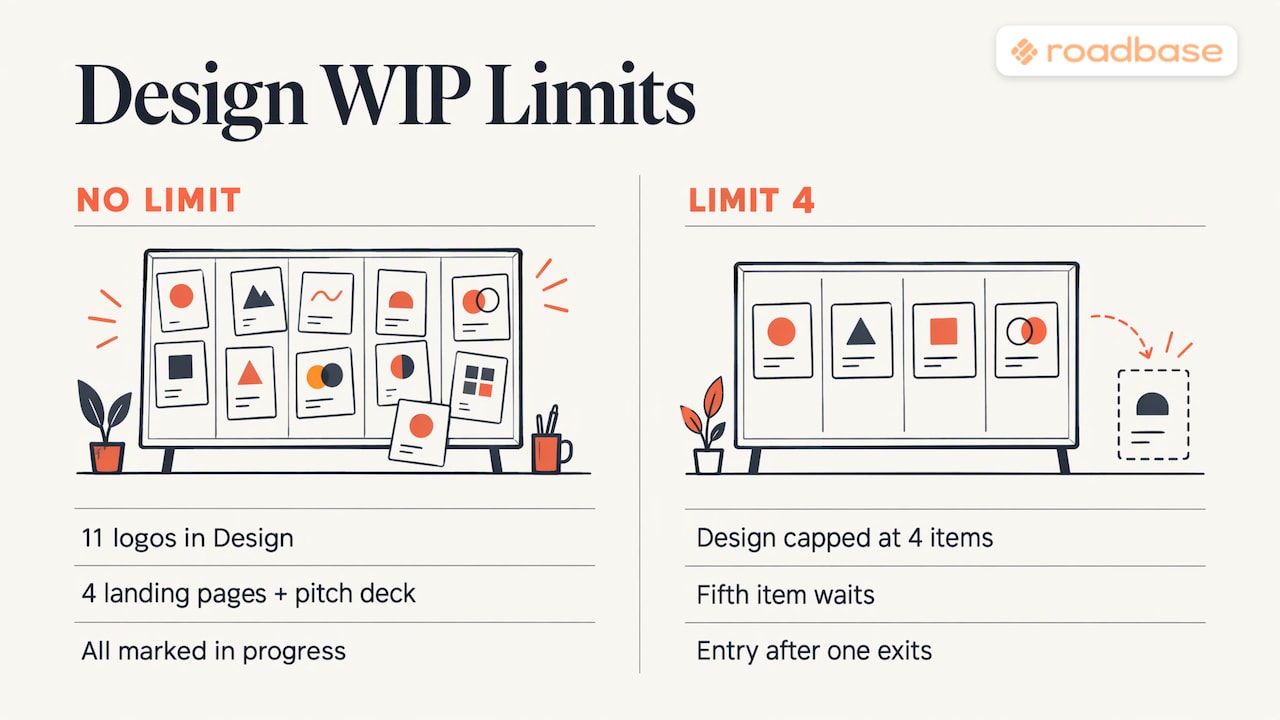
Picture a three-person studio with a board that reads Brief, Design, Client Review, Revisions, Delivered. Without limits, Design can collect eleven logos, four landing pages and a pitch deck. With a limit of four, a fifth item waits. If a design can't move because Client Review is full, someone can chase an approval or help resolve a question before starting the next job.
Why limiting work in progress improves delivery
A full lane gives the team a reason to look at what is already underway. For more on controlling work in progress, see PMI's Disciplined Agile guidance.
For creative work, this shows up in familiar ways.
- Less context switching. With fewer open assignments, a designer may spend more of the day on the brand identity before switching to the social campaign or website refresh.
- Visible bottlenecks. When a blocked item takes up a slot in a full lane, it's easier to see what is holding up the next card. Agile practitioner Andy Cleff offers further reading on limited WIP.
- Earlier feedback. Finishing a draft before pulling another gives the team a chance to get it in front of the client sooner.
- A more manageable pace. A full lane gives the team a clear point to pause and agree what should move before opening another job.
An Agile Alliance experience report from Ultimate Software describes how one software team changed its workflow, including adding limits to queueing columns such as "Ready for QA." For a design studio, Client Review is a place to look for the same pattern of work waiting to move.
If a limit frees someone up, they can help move an existing item or improve the workflow. Planview has more examples of getting started with WIP limits.
Where to apply a limit
You have three common choices, and you can combine them.
| Level | What it caps | Best for |
|---|---|---|
| Per stage (board column) | Items in Design, Review, Revisions | Teams that want to see where work queues |
| Per person | Items one person holds at once | Freelancers and very small teams |
| Whole workflow | Total open projects | Agencies with many concurrent clients |
A per-stage limit helps you see where work is waiting. A solo freelancer can treat "me" as the stage: a personal cap on the number of live projects.
For a creative agency, a useful extra is a limit on the review and approval stages specifically. If drafts often wait for feedback, a cap in Client Review gives the account manager a cue to follow up before the team starts another job.
How to set your first WIP limit
Choose a starting number you can test on your own board.
- Two to three items per person per stage. Microsoft Learn's Azure Boards documentation suggests counting the current work in each column as a baseline, then allowing two to three items per team member working in that stage. Three contributors at two items each gives a limit of six.
- N + 2. The Dojo Consortium suggests an initial limit of N+2, where N is the number of people contributing to that lane. With three contributors, you'd start at five.
- One or two backlog items for a Scrum team. Scrum Alliance contributor Jim Schiel suggests starting with one or two backlog items for the team and checking the limit at the daily scrum.
Jonathan Hall offers further reading on choosing WIP limits.
For a creative team, here's how to turn one of those starting points into a trial.
- Count what is open in each stage today. That is your baseline.
- Pick an initial cap for each active stage based on who works there. Two items per contributor is one option.
- For Client Review, consider how many accounts your team can realistically follow up with in a week.
- Write the limits on the board and explain to clients when their work is expected to start and when you'll need feedback.
A worked example
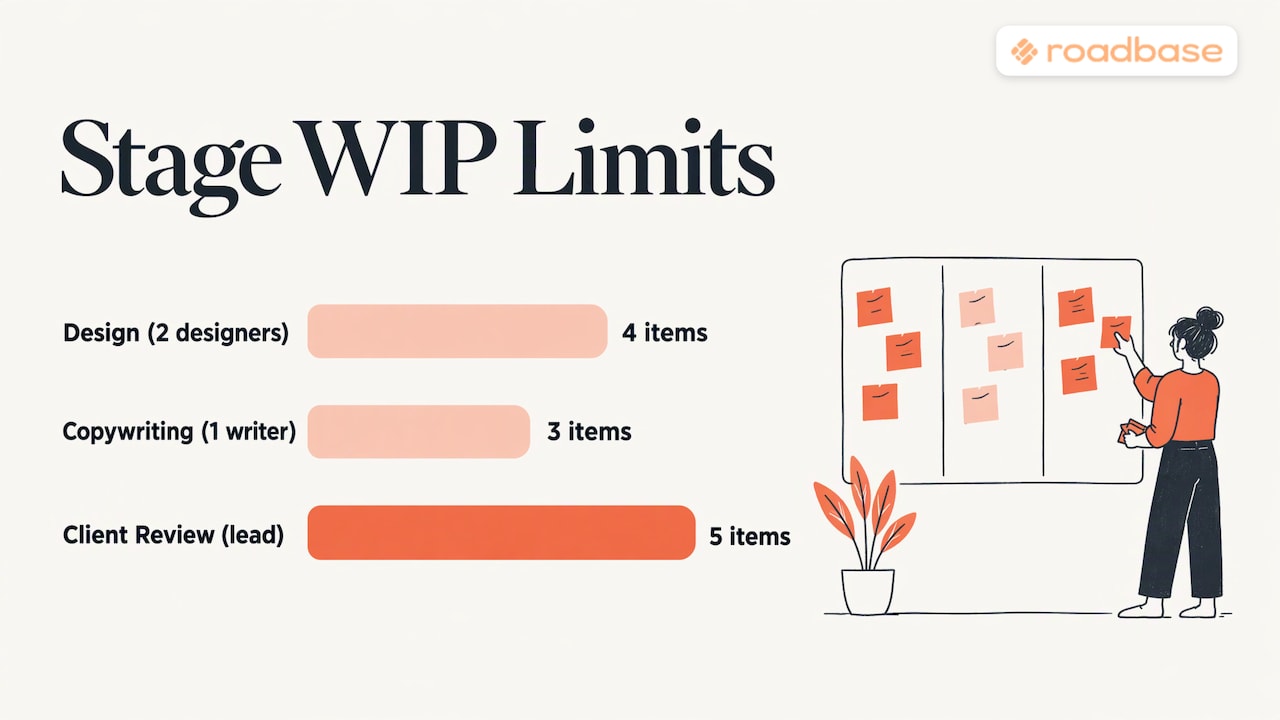
Take a four-person agency: two designers, one copywriter, one project lead. The designers share a Design stage, so two people times two items gives a limit of four. The team tries a limit of three for Copy and watches whether drafts move through the stage or sit half-written. Client Review gets a limit of five, matched to how many clients the project lead can follow up on at once.
On day one, Design holds six items. Finish or unblock the work already there, pull the next item once Design has a free slot, and note which items stalled on the way. Those stalled items are your first improvement list.
Calculating a limit from your own data
In a stable workflow, Little's Law says long-run average WIP equals throughput multiplied by mean elapsed cycle time. Use the same workflow boundaries and matching units over a representative period. Say your team delivers two items a week and each takes three weeks from start to delivery on average. The team has about six items in progress on average. That's an estimate of how much work is already underway. You could test a cap of five and remeasure cycle time and throughput together to see what changes.
To do this, use the dates and completion counts on your board.
- Throughput. Count how many items cross the finish boundary per period, such as deliveries per week.
- Cycle time. Measure the elapsed time from the chosen start to finish for each completed item, including time spent waiting within those boundaries, and take the mean. If throughput is in items per week, use weeks for cycle time.
Track hours to see how much effort an item takes and use that information to scope similar work. Our guide to finding billable and non-billable leakage shows how to see where hours go, and time tracking software for creative teams covers the tools.
What to do when a stage is full
When a stage is full, finish or unblock something before starting new work. The Project Management Formula gives a content-team example: a writer blocked by a full review stage helps clear the review queue before pulling a new piece.
Here are a few things the team can do.
- Help clear the blocker. If Revisions is full because three clients are still reviewing drafts, send the follow-ups before opening a fourth project.
- Help downstream. A designer who cannot start new work can prepare export files, organize assets or review a colleague's draft. AWS's builder community makes the same point about developers: those who cannot take new work collaborate on existing items or help the downstream team.
- Agree what happens next. If an item has stalled, name who will follow up and when. Keep counting blocked or paused items that are still inside the workflow. If the team formally takes a job out of the workflow, record the decision and agree when to revisit it.
Handling urgent requests
Urgent work is where limits get tested. A Scrum.org article on WIP limits discusses how interruptions affect work already underway. Give the team an agreed, visible way to handle exceptions.
- Create an expedite lane with a small limit, such as one item at a time.
- Agree what qualifies, such as a client-facing error or a launch-day fix, and which work can be deferred to make room.
- Before pulling the urgent item, see what can be finished or unblocked. If you defer something, show it on the board and keep counting it as WIP while it stays in the workflow.
Music producers face a similar choice when ten tracks are half-mixed and a release needs attention. See these practical ideas to speed up your mixing workflow for a mixing example.
When to review and adjust
Treat the first limit as a hypothesis. A monthly review is one option. Look at cycle time and throughput together, and bring a few cards that stalled so the team can see where the time went.
- If cycle time rises or items sit in a lane, look for common causes such as late feedback, missing assets or unusually large jobs.
- If throughput falls, check what changed in the mix of work and whether the cap is keeping people from pulling work when they could finish it.
Try adjusting one stage at a time and track both measures again. Keep the limit, raise it or lower it based on how the work moves.
Common mistakes with WIP limits
- Setting limits and ignoring them. A limit that is routinely exceeded is decoration. If you break it, say why and fix the cause.
- Counting only the active stages. Count work waiting for client feedback and any blocked or paused items still inside the workflow. A separate limit for Client Review can make that queue visible.
- Starting too high to avoid discomfort. A cap far above the amount of work you usually carry may rarely get tested. Pick a number the team can learn from, then adjust it as you see what stalls.
- Ignoring work size. Ten one-hour tasks and one six-week brand project are not equal cards. Break large projects into phases and deliverables so a card represents a reasonably similar amount of work. Our guide to the creative project work breakdown structure shows how.
- Accepting work without a scope. If a card keeps growing, the problem started before the board. See how to prevent scope creep in creative projects and use change request templates to keep scope changes visible.
Our perspective on WIP limits and scoping
On a studio board, a two-day banner set and a ten-week identity system can each take up one slot. Look at the phases, review rounds and estimated hours behind each card before deciding how much to keep open. Breaking a bigger project into deliverables can make it easier to see what's ready to start and what needs to wait.
When the work is done, compare tracked hours with the original estimate. If the identity system took longer because of extra review rounds, use that experience when you scope the next job and decide what else can run alongside it.
Plan the work before it enters the board
Bring a real client brief, rough notes or a PDF into Roadbase to draft the plan. Review and adjust the phases, tasks, roles and estimated hours, then check the quote and export a proposal PDF when you're ready. Current plan details are on the Roadbase pricing page.

If you are comparing tools for managing capacity and time, our write-ups on Float alternatives, Harvest alternatives and Productive alternatives may help.
FAQ
What does WIP mean in Kanban?
WIP stands for work in progress. It includes work that has started and is still inside the workflow, even when it's waiting for a client or blocked. In Kanban, a WIP limit caps how many items can be in a stage or workflow at once.
What is a good WIP limit to start with?
Try two to three items per person contributing to the stage, as Microsoft Learn suggests, or start with the number of contributors plus two. Pick one and review how work moves before you adjust it.
Should WIP limits apply to each person or each column?
Use a per-column limit to see where items queue, a personal cap to manage how many projects you have open as a freelancer, or a workflow-wide cap to manage total open projects across an agency. You can combine them.
What happens when a WIP limit is reached?
Finish an item, clear a blocker or help the next stage before pulling new work. If the team has agreed on an expedite exception, show the urgent item on the board and keep it within that exception's small cap. Keep counting any deferred items that are still in the workflow.
How often should we change our WIP limits?
Set a regular review, such as monthly, and look at cycle time and throughput together. If items stall, cycle time rises or throughput falls, check what changed before adjusting the cap.
Sources
- Limiting Work in Progress, Dojo Consortium
- Controlling Work-in-Process (WIP), PMI
- Ultimate Kanban at Ultimate Software, Agile Alliance
- Work In Progress: A Case for Limited WIP, Andy Cleff
- Getting Started with WIP Limits, Planview
- Set Work in Progress Limits in Azure Boards, Microsoft Learn
- Mastering the Art of Work in Progress on a Scrum Team, Scrum Alliance
- How should we choose our WIP limits?, Jonathan Hall
- Kanban Board Setup for Content, Project Management Formula
- How WIP Limits Help You Get More Done Using Kanban, AWS
- WIP Limits in Scrum with Kanban, Scrum.org